
Upload Settings on the Rebalancing System Settings page allow you to change how Tamarac Trading treats some of the information you add through upload. The Do not report account value discrepancy warnings if the uploaded account value is within option lets Tamarac Trading know when to warn you when uploaded account value is different from holdings information.
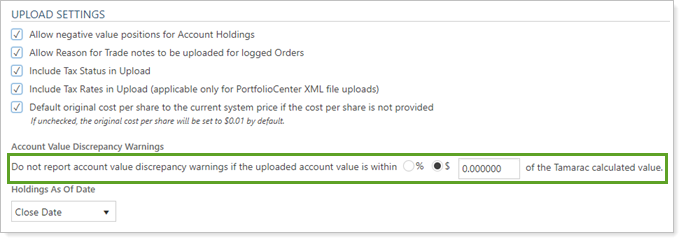
These are the available options:
- Percent (%).Tamarac Trading will compare uploaded account value and holdings information and will warn you if the value you upload for a particular account is outside the range you enter. By choosing %, you can specify that threshold in terms of a percent of account value (e.g. warn of a discrepancy larger than 1% of account value).
- Dollar ($).Tamarac Trading will compare uploaded account value and holdings information and will warn you if the value you upload for a particular account is outside the range you enter. By choosing $, you can specify that threshold in terms of the dollar amount of the discrepancy (e.g. warn of a discrepancy larger than $100).
Once you've selected your value criteria, either % or $, enter your specific value as well.
