
Contents
When a client holds more of a security than your model calls for, such as concentrated stock or a tax-lot constraint, you may not want to trade the extra shares. Rather than build an alternate model, you can restrict part of an account's holding in a security as unmanaged. You enter the portion to set aside as shares, dollars, or a percent of the position. Your rebalance trades only the remaining managed portion.
Example
Your model calls for 400 shares of AAPL, but a client holds 1,000 and wants to retain the additional 600.
Not using partially managed securities: If you managed all 1,000 shares, the rebalance identified AAPL as overweight and proposed sells you had to override. If you unmanaged all 1,000 shares, you had to build an alternate model set without AAPL.
Using partially managed securities: You designate 600 shares as unmanaged. Rebalancing considers only the remaining 400 shares for trading, so AAPL no longer appears overweight relative to your model.
Settings
See the following for the account settings for partially unmanaged securities.
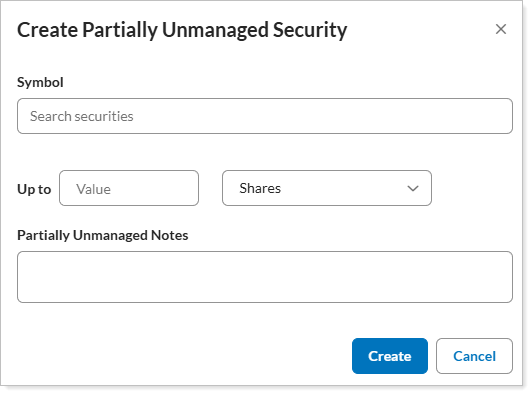
| Setting | Definition |
|---|---|
| Symbol | Enter the security symbol that you want to restrict as partially unmanaged. |
| Up to... |
In Value enter the amount of the security to leave unmanaged. Use the list to specify the units. Your options are:
|
| Partially Unmanaged Notes | Optionally, enter information about this partially unmanaged designation. Notes can contain up to 150 characters. |
For the steps to set a partially unmanaged security restriction, see Add a partially unmanaged security restriction.