Contents
|
Step One: Enable Notes Integration |
Introduction
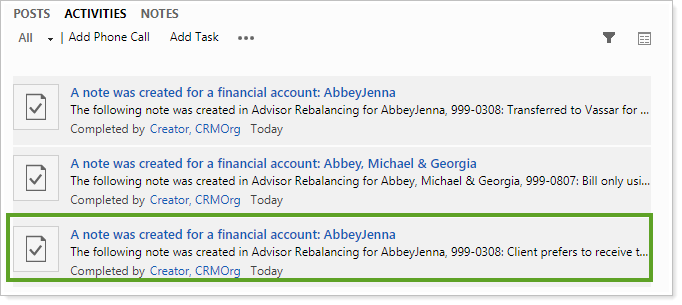
There may be times you've added a note to Tamarac Reporting, perhaps to record change in the client's financial situation, investment preferences, or life status. But you want to see it in Tamarac CRM, the home for all your client management records and activities. With account notes integration, you can create account notes in Tamarac Reporting and see them automatically sync to CRM.
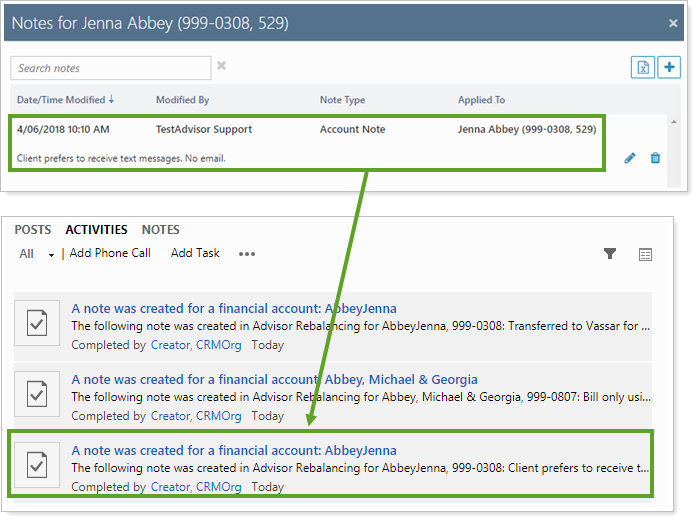
You can configure CRM to display and use Tamarac Reporting notes in a variety ways within CRM, including:
-
See notes in a CRM dashboard
-
Use notes to trigger workflows
Note that:
-
This is a one-directional sync from Tamarac Reporting to Tamarac CRM.
-
This does not sync to the Financial Account's social pane notes. Instead, it creates a trackable and searchable task that can also be displayed in the social pane.
Step One: Enable Notes Integration
To enable notes integration between Tamarac Reporting and CRM, please contact your Service Team.
Step Two: Create a Note in Tamarac Reporting
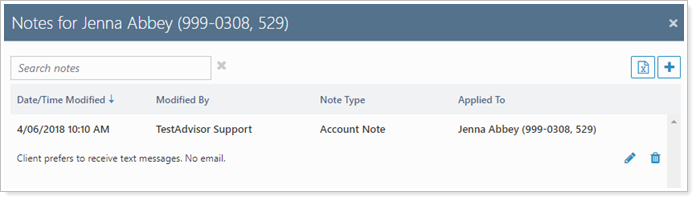
In Tamarac Reporting, create a note for the desired account. For more information about notes in Tamarac Reporting, see Learn More About Notes on the Accounts Page.
Step Three: Note Syncs Automatically to CRM
Once created, account notes in Tamarac Reporting automatically generate an external event log record in CRM.

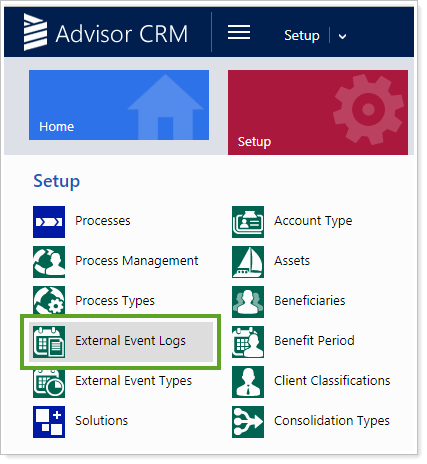
Only users with administrative access can see External Event Logs. Administrators can set up workflows triggered by External Event Logs for all users.
To access External Event Logs, click Setup and click on External Event Logs.
You can use the event log record in CRM to interact with notes in a variety of ways, including:
-
Monitor Account Notes With a Dashboard View: Create a dashboard view showing an External Event Log view optimized to show most recent note-related Event Types.

-
Trigger Workflows for Tracking Notes: Use External Event Logs to create a task that then triggers a workflow, such as create a new open task to review the note, or display the note as a completed Task at the CRM Account level.