
Contents
Introduction to Selective Sync
Unlike a firm-wide data sync, Selective Sync lets you update only specific client accounts. You might do this:
-
After making single-account changes.
-
When managing time-sensitive requests.
-
To avoid unnecessary processing.
This option gives you greater control over updates and ensures you only sync the data you need for your clients.
For information about the status of your daily reconciliation, see Track data reconciliation with the Account Publish Dashboard.
Run a Selective Data Sync
To run a selective sync, follow these steps:
-
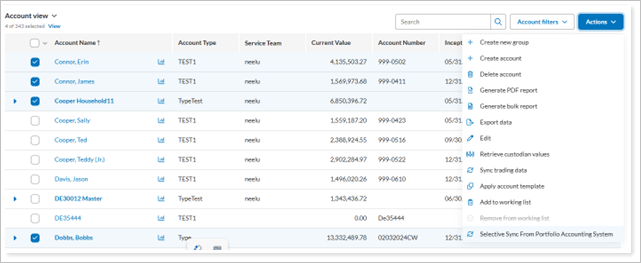
From Account view, select one or more accounts to sync.
-
In the Actions menu, choose Selective Sync from the Portfolio Account System.
-
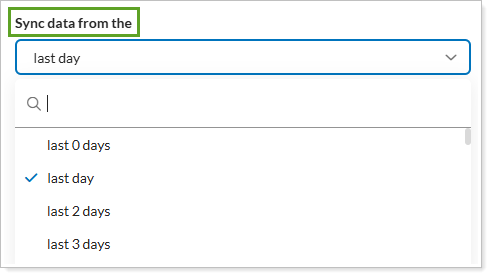
Choose the Sync data from time period you would like.
-
To update Tamarac Trading for accounts you've not yet rebalanced today, select Export to Tamarac Trading after import.
-
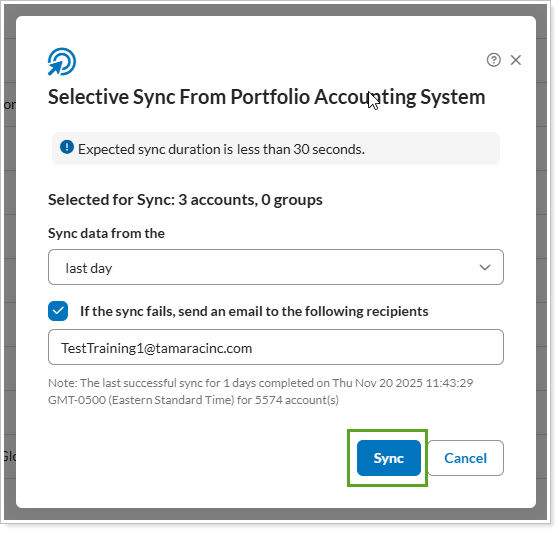
If you would like to receive a sync failure notification, select the If the sync fails, send an email to the following recipientscheck box and type the email address you want to use.
-
In the Selective Sync From Portfolio Account System panel, confirm the details for your request and select Sync.
Notes
By default, only Site Admin users have permission to run a selective sync. You can add permissions for other roles if you choose. See Manage Permissions for Roles for more details.