
Contents
|
Save and Share Modules and Sections Report on Unrealized Gains and Unrealized Losses Separately Use Custom Fields and Bond Analysis Data Points as Available Columns and Groupings |
Report Builder Updates
The Report Builder tool gives you flexibility and configurability in reporting. We continue to expand the tools and features available in the Report Builder tool. This release features the following enhancements:
-
Save and share modules and sections.
-
Include Tamarac custom fields in Report Studio.
-
Expanded and smarter Bond Analysis reporting.
-
Add separate columns for unrealized gains and losses.
Save and Share Modules and Sections
In the past, each time you built a report in Report Builder, you had to manually recreate your preferred modules or sections from scratch—a process that could be time-consuming. With this release, you can easily save and share modules and sections for reuse, streamlining your workflow and making it simpler and faster to apply your most effective settings across reports or share them with colleagues.
After you save the module or section, they will appear in the Module or Section library.
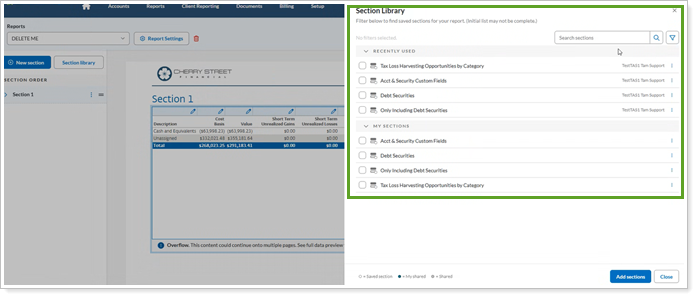
The green dot indicates that a module or setting is shared.
You can only delete modules if they are not currently in use.
Report on Unrealized Gains and Unrealized Losses Separately
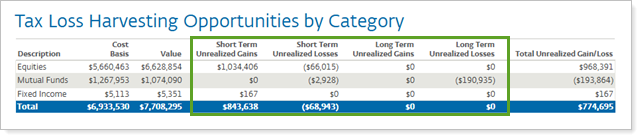
We understand the need for a clear analysis of gains and losses. In the past, you had to review unrealized gains and losses in the same column. Based on your feedback, we're splitting up unrealized gains and unrealized losses so you can report on them separately. Now you’ll see the following new columns available in the Report Builder:
-
Short Term Unrealized Gains
-
Short Term Unrealized Losses
-
Long Term Unrealized Gains
-
Long Term Unrealized Losses
These separate columns will help clarify potential tax implications that were previously combined in our reports.
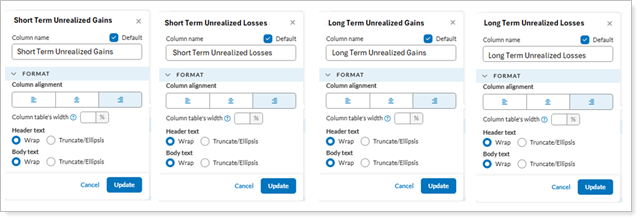
You will see the setting for each of these new columns under Columns Settings in Report Builder.
Use Custom Fields and Bond Analysis Data Points as Available Columns and Groupings
Custom Fields
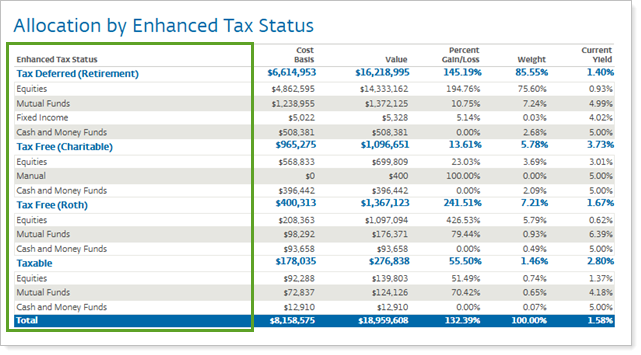
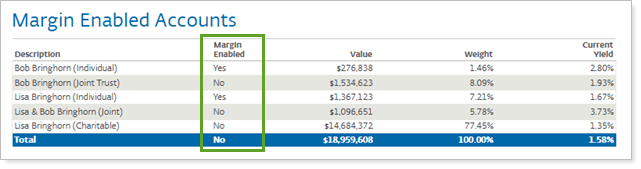
You track certain account, group, or security attributes using custom fields. In the past, you couldn’t report on these specifically, making it difficult to evaluate some of those characteristics. With this release, you can add custom fields as grouping or columns in Report Builder.
Example: Group By Custom Field
Example: Custom Field as a column
Bond Analysis Data Points
Reporting on callable bonds requires careful consideration. In the past, you had to use the Next Call Date setting to organize bonds correctly in reports. With this release, we intelligently pick between the call and maturity dates based on the bond's current price and call price. This simplifies your reporting and helps ensure accuracy.
Example: Bond Analysis Data Points as Columns and Grouping
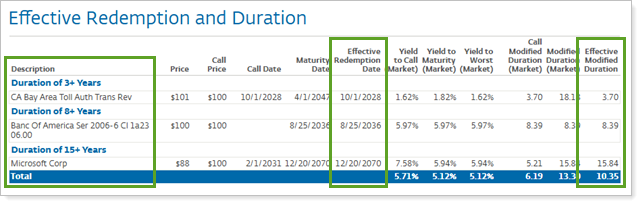
New columns available:
-
All custom fields.
-
Effective Redemption Date
-
Effective Modified Duration
Group by options available:
-
All custom fields
-
Effective Duration
-
Effective Redemption Year
-
Bond Ratings
-
Issue State
New, Stronger Password Requirements
Keeping your data secure is of paramount concern to us. In addition to robust data protection, we’re helping reduce the risk that you and your clients get hacked due to password insecurity.
In the past, Tamarac’s password rules were simpler and allowed users to repeat old passwords or choose ones that were easy to guess. This made it easier for hackers to gain access to sensitive information, which could put you and your clients at risk.
With this release, updating password requirements to enhance security. You will now need to create stronger, more complex passwords that are harder for others to guess. You also won’t be able to reuse recent passwords, and the system will block passwords that are common or have already been exposed in data breaches.
These changes will help keep your accounts safer and protect your clients’ information. With better password security, you can focus on achieving your clients' financial goals, knowing your data is better protected.