
Contents
Report Studio
Audit Report Studio Changes
What's changing
As an advisor, you need a clear way to track changes you make in Report Studio. With this release, Report Studio records saved changes to reports, sections, and modules in an audit log. You can export that audit log to see what changed, who made the change, when it occurred, and the before-and-after values for each saved update.

These audit logs allow you to:
-
Capture detailed Report Studio changes. Record the resource name, resource type, action performed, date of change, user who made the change, and specific field or setting updates, including values before and after saved changes.
-
Export audit details. Export these audit logs directly from the resources grid in CSV format for offline analysis or compliance documentation.
Why you'd use it
Use audit logs to investigate differences in a client’s quarterly report or confirm when reporting assets changed. You can use the audit information to restore previous configurations if needed.
You can also export audit data or use the Usage link to monitor accidental deletions and changes to shared reporting assets.
How to get started
To access your audit history:
-
From the Report Studio home page, select Actions next to the report or module you want to retrieve audit details for. You can access this information in the Name column or under Pick up where you left off on the Report Studio home page.
-
Select Export audit log to download the audit log in CSV format.
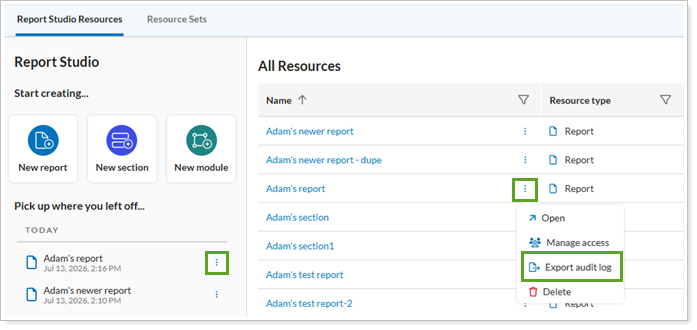
The audit log downloads to the folder you designate on your computer.
Additional information
For details, see Export Report Studio Audit Log.