
Contents
Add or Update Trade Order Instructions in Bulk
This enhancement will help those who use the FIX Flyer interface to quickly add or update trade order instructions for multiple accounts.
In Tamarac Trading, you can add or modify trade order instructions one order at a time from the Rebalance Summary page, before approving them for execution at FIX Flyer. While a trade order can apply to multiple accounts, you still had to edit each order one at a time.
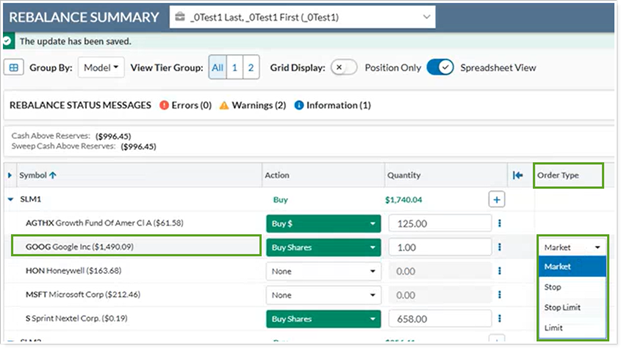
With this enhancement, we’re adding the ability to enter order instructions for multiple accounts before you approve the orders. You’ll be able to select multiple accounts on the Rebalance page, then from Actions select Edit Order Instructions.
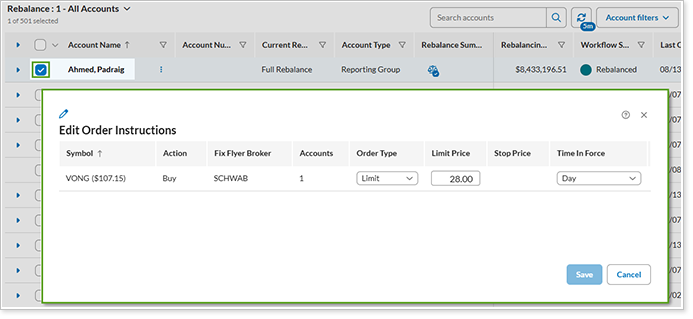
In the new Edit Order Instructions dialog, you can see and edit details of unique trade order combinations for the accounts selected.
As always, you can't add or modify trade order instructions after you've approved orders for execution.
Track an Order’s Progress After You Split or Merge It
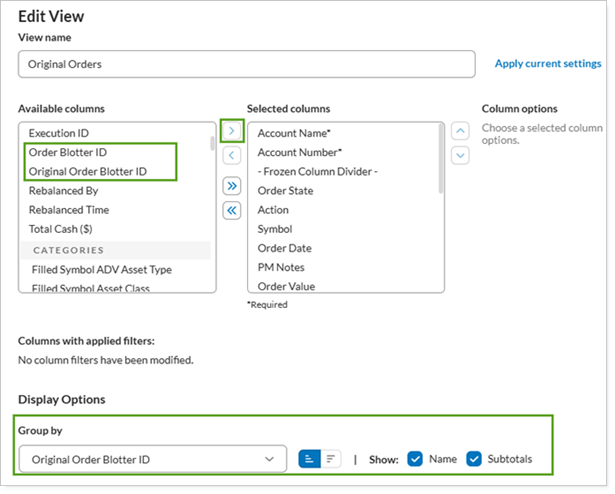
This enhancement will help those who use the Order Blotter in Tamarac Trading. When you split or merge a trade order as you work on it, you end up with multiple downstream orders. To ensure you’re in line with the original intended order, you can track the original order’s overall progress with a new column, Original Order Blotter ID. This column also appears when you export the page, allowing more detailed tracking.
The platform retains the Original Order Blotter ID on downstream orders when they’re partially filled, fully filled, and reconciled, even if the original order is deleted.
Example
Order ID 903 for 11 units came from the original order ID 901.

To track orders associated with their original orders, in Order Blotter, group by Original Order Blotter ID.
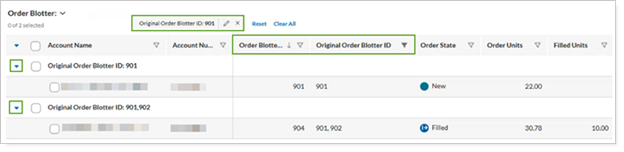
Further narrow your selection by filtering for specific order IDs.
Export your Order Blotter view to see Original Order Blotter ID in the CSV.
