
Contents
Introduction
Service requests create workflows that can help standardize and automate your administrative processes in Tamarac CRM. To meet your firm’s specific needs, you can customize service requests with your unique data and actionable follow-up.
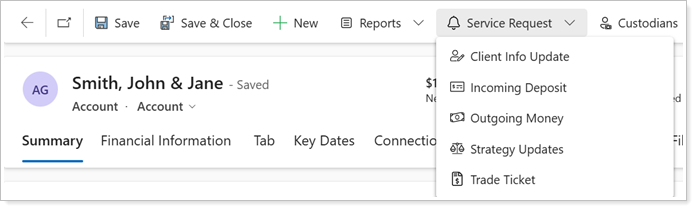
This page provides best practices and steps for how to build custom service requests.
To learn more about this, enroll in the Tamarac University course Customizing Tamarac CRM's Service Requests.
Before You Start
To customize service requests, you must be enabled with System Customizer permissions. To enable these permissions, please contact Tamarac Support.
Plan Out Your Custom Service Request
Custom service requests influence firm-wide data collection and workflow automation, so careful planning is essential.
To build an effective service request workflow for your firm, consider the following factors:
-
Determine the right workflows for your firm. To support your discovery process, create a visual flow document. For a quick start, reach out to your Tamarac Support team to request a copy of the Tamarac CRM Service Requests Template to identify how each request could fit into your operations.
-
Identify key data points to gather. To ensure the service request collects essential information, define the fields necessary for each request.
Example
You may want to add a Withdrawal Reason field to an Outgoing Money service request to gather more personal insight into a withdrawal need for a client.
-
Consider field requirements and visibility. To simplify data collection, determine mandatory fields and conditional fields that should only appear when triggered by a specific response.
Example
You may want the selection of Yes to Free Up Cash in an Outgoing Money service request to prompt an additional required field for Free Up Cash Task Owner. This will also simplify the request for users that don’t need to free up cash and complete extra steps.
-
Evaluate the appropriate question formats for data collection. To streamline data entry, select the most effective data types for each field.
Example
You may prefer to use text fields for open-ended responses, dropdown lists for predefined choices, and yes/no toggles for binary selections.
-
Define follow-up actions. To automate workflows efficiently, determine what follow-up tasks should be triggered and what details should be included.
Example
You may want a service request to trigger a Task where you can customize the Task Subject, Task Description, Owner, Due Date, and more.
Thoughtful planning at this stage can help you create efficient workflows that function as intended. Consult Tamarac Support as needed to help your firm discover and effectively implement the appropriate workflows.
Set Up a Custom Service Request
To efficiently build a custom service request that is tailored to your firm operations, consider all required and optional steps in the following workflow:

For more details on this process, see Workflow: Set Up Custom Service Requests in Tamarac CRM.