
Contents
Introduction
The Fidelity integration allows you to directly launch from Tamarac CRM into Fidelity Wealthscape, Fidelity’s open-architecture brokerage platform designed to deliver a connected experience for advisors.
With the integration enabled, you can launch directly into Wealthscape from eligible account records in Tamarac CRM.
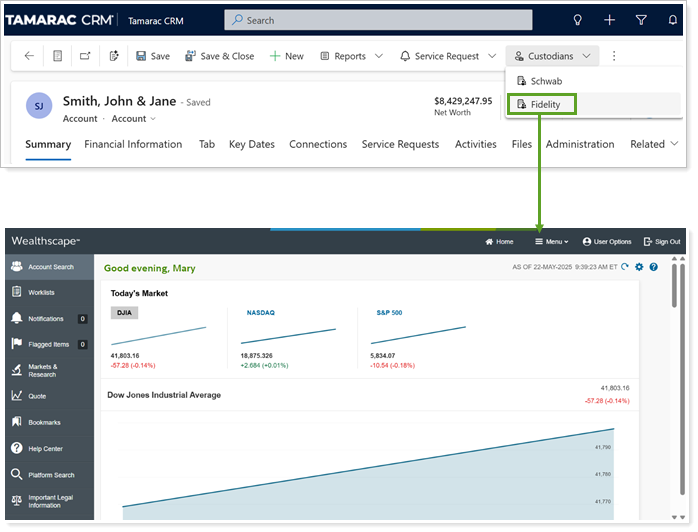
This page provides steps for how to turn on the Fidelity integration in Tamarac CRM.
Enable the Fidelity Integration
The Tamarac Data Manager for your firm must enable or disable the Fidelity integration for all users at your firm. Contact Tamarac CRM Support for additional guidance.
To enable the Fidelity integration:
-
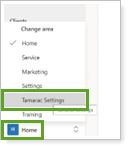
In Tamarac CRM, in the bottom left under Home, select Tamarac Settings.
-
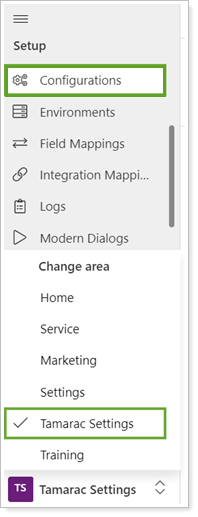
Under Setup, select Configurations.
-
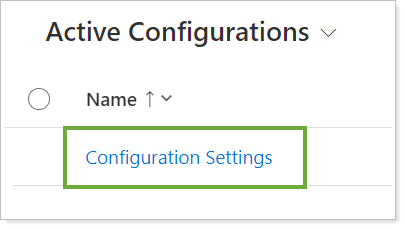
Select Configuration Settings.
-
To open the configuration page, in Custodians, select Fidelity.

-
Under General, turn on Integration.

-
Select Save or Save & Close.

Next Steps: Enable Fidelity Single Sign-On (SSO) Feature
The Fidelity integration and Single Sign-On (SSO) feature are disabled by default. Once you’ve enabled the overall Fidelity integration, you must turn on the SSO feature separately. For steps, see Access Fidelity Wealthscape from Tamarac CRM.
Note
When you disable the Fidelity integration, all integration features will automatically be turned off.