
Contents
Introduction
Compliance dashboards in Tamarac CRM provide focused system views designed to support regulatory oversight and ongoing due diligence. These dashboards surface key compliance data, such as overdue tasks, regulatory delivery timing, and incomplete data. By highlighting potential risks and gaps in your compliance processes, they empower you to take timely, informed action and strengthen your firm’s overall operations.
The following system dashboards are available:
-
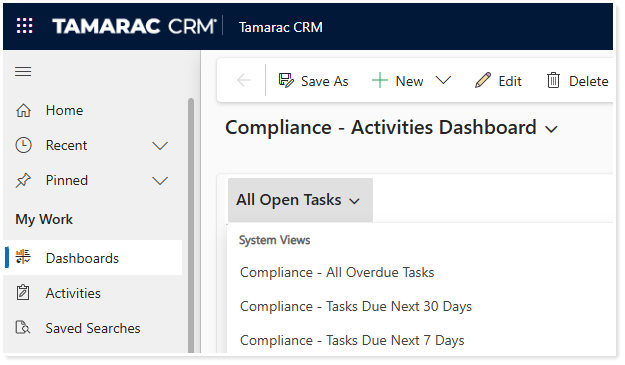
Compliance – Activities Dashboard. Gain a clear, actionable view of open and overdue tasks, appointments, and phone calls, enabling proactive follow-up and improved task management.
-
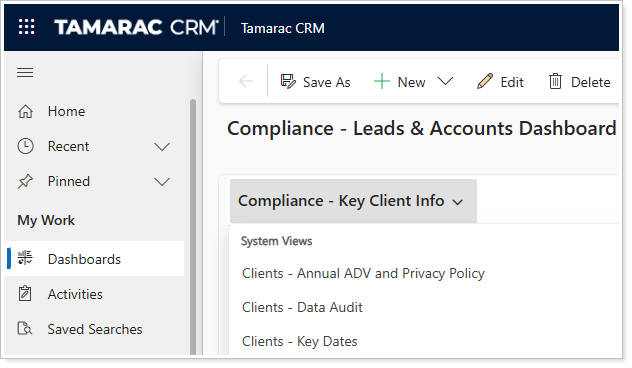
Compliance – Leads & Accounts Dashboard. Monitor critical compliance milestones like Form ADV and Privacy Notice delivery, ensure data accuracy, and stay on top of key deadlines.
This topic provides information about the features of the compliance dashboards.
Before You Start
To access the compliance dashboards, you must be assigned the Tamarac Compliance Dashboards (Managed) security role. For access, contact your dedicated Support team.
Access Dashboards
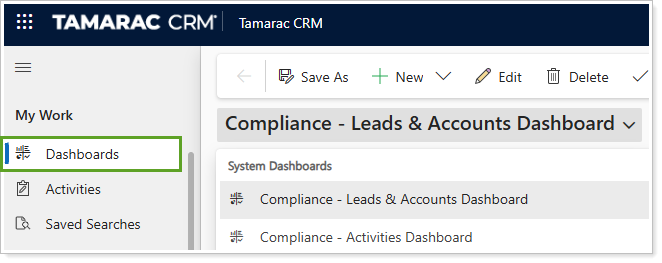
To access the compliance dashboards, in the Home area, under My Work, select Dashboards.
Compliance – Activities Dashboard
Use this dashboard to see detailed information about outstanding and overdue activities, including tasks, appointments, and phone calls.
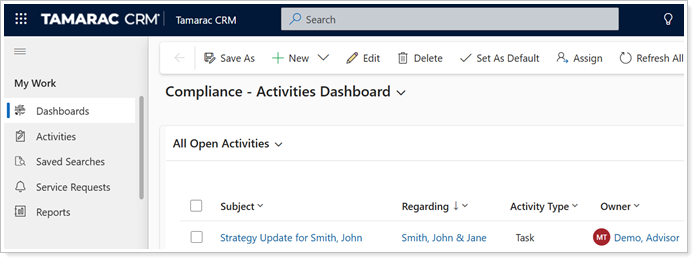
The Compliance – Activities Dashboard features a series of filtered list views as outlined below:
| List | System View | Key Insights |
|---|---|---|
| Activities | All Open Activities | Draws attention to all open activities. |
|
All Overdue Activities |
Draws attention to only overdue activities. Displays all open, scheduled activities that are overdue by one or more days. | |
| Tasks | All Open Tasks | Draws attention to all tasks that are open. |
| Compliance – All Overdue Tasks | Draws attention to all tasks that are open and exceeded the due date by one day or more. | |
|
Compliance – Tasks Due Next 30 Days |
Draws attention to all tasks that are open and have the due date in the next 30 days. | |
|
Compliance – Tasks Due Next 7 Days |
Draws attention to all tasks that are open and have the due date in the next seven days. | |
| Leads | Compliance – Key Lead Info | Draws attention to key information on open leads. |
| Leads – Data Audit | Draws attention to open leads, including fields like Potential AUM, Lead Source, Referred By, and more. | |
| Leads – Key Dates | Draws attention to open leads with key date fields included. | |
| Appointments | Compliance – All Open Appointments | Draws attention to all the appointments that are either open or scheduled. |
| Compliance – All Overdue Appointments | Draws attention to all the appointments that are either open or scheduled and exceeded the end time by one or more days. | |
| Compliance – Open Appointments Next 30 Days | Draws attention to all the appointments that are either open or scheduled and have the start time coming up in the next 30 days. | |
| Compliance – Open Appointments Next 7 Days | Draws attention to all the appointments that are either open or scheduled and have the start time coming up in the next seven days. | |
| Phone Calls | Compliance – All Open Phone Calls | Draws attention to all open phone calls. |
| Compliance – Overdue Phone Calls | Draws attention to all open phone calls that exceeded the due date by one or more days. | |
| Compliance – Phone Calls Next 30 Days | Draws attention to all open phone calls that are due in the next 30 days. | |
| Compliance – Phone Calls Next 7 Days | Draws attention to all open phone calls that are due in the next seven days. |
Compliance – Leads and Accounts Dashboard
Use this dashboard to see key compliance data, such as delivery dates for Form ADVs and Privacy Notices, data completeness, and important key dates.
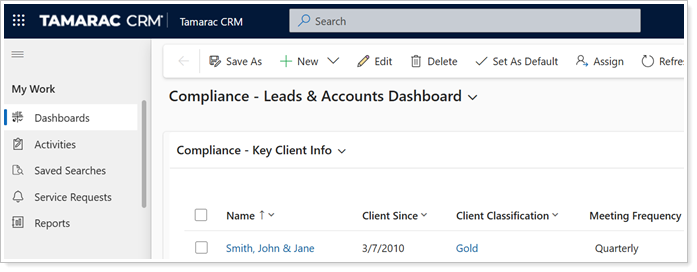
The Compliance – Leads & Accounts Dashboard features a series of filtered list views as outlined below:
| List | System View | Key Insights |
|---|---|---|
| Accounts | Compliance – Key Client Info | Draws attention to key information on active households. |
|
Clients – Annual ADV and Privacy Policy |
Draws attention to active households with primary contacts allowing email communication, capturing details around the Last ADV Sent date and Last Privacy Notice Sent dates on the accounts. | |
| Clients – Data Audit | Draws attention to key information on active households, including fields like Client Since, Agreement Date, Meeting Frequency, and more. | |
| Clients – Key Dates | Draws attention to active households with all the major key date fields included. | |
| Accounts |
Compliance – Clients Added This Year |
Draws attention to households that were created in this current year. |
|
Compliance – Clients Terminated This Year |
Draws attention to households that were terminated this current year. | |
| Leads | Compliance – Key Lead Info | Draws attention to key information on open leads. |
| Leads – Data Audit | Draws attention to open leads, including fields like Potential AUM, Lead Source, Referred By, and more. | |
| Leads – Key Dates | Draws attention to open leads with key date fields included. | |
| Leads | Leads – Created This Year | Draws attention to leads that were created during this current fiscal year. |
| Leads – Created This Week | Draws attention to all leads that were created during the current week. | |
| Leads – Created Last Week | Draws attention to all leads that were created during the last week before the current week. | |
| Leads – Disqualified This Year | Draws attention to all leads that were disqualified during this current year. | |
| Leads – Qualified This Year | Draws attention to all leads that are qualified and are related to an account created during the current year. |