
Contents
|
Complete activities to automatically update key dates |
Introduction
In all relationships, you have to remember and act on certain dates, whether it’s a wedding anniversary or a kid’s birthday. In the case of your client relationship, these milestones are review dates, onboarding events, compliance touchpoints, and more.
The Key Dates feature helps you track those important client milestones directly on account and lead records in Tamarac CRM.
You can enter all key dates manually. Some dates automatically update when you complete related activities in CRM.

By reviewing and maintaining key dates, you can quickly understand where a client or prospect is in their lifecycle and act at the right time.
This article covers how to use key dates in CRM.
Manually update key dates
Account and lead records both include a Key Dates tab where you can manually update key date.
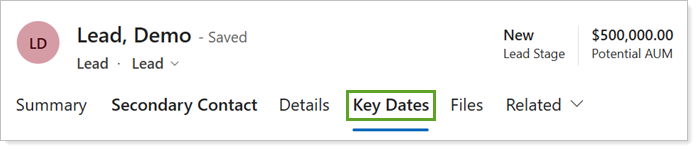
Each field is editable and supports standard date entry. To manually update key dates, you can:
-
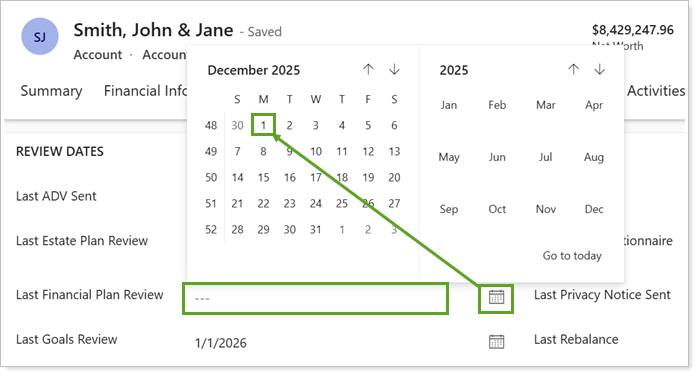
Select the field to enter the date.
-
Use the calendar
 and arrows to navigate through and select the desired date. Optionally, select Go to today to automatically update to the current date.
Best Practice
When you manually update key dates, use consistent criteria across your firm to ensure accurate tracking and visibility.
Complete activities to automatically update key dates
When you complete certain activities in Tamarac CRM, related key date fields update automatically on the associated account or lead. All key date fields remain manually editable, even when they’re updated automatically.
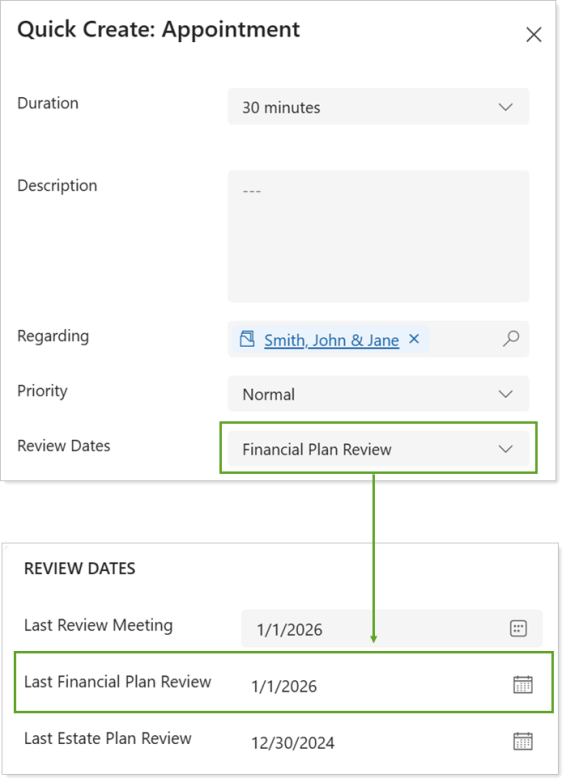
Tasks, appointments, and phone calls allow you to select dates that correspond with the key date fields under the Review Dates section of account records.
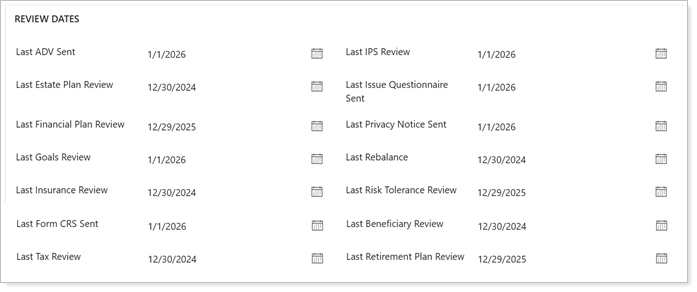
Once you complete the activity, the corresponding review date will automatically update on the account record. Lead records don't display review dates, so the dates won't reflect on the record until the lead is qualified.
Activities that automatically update key dates
For accounts and leads, each activity automatically updates the following key date fields:
| Completed Activity | Key Dates Updated | Record type updated |
|---|---|---|
| Phone Call |
Last Contacted |
Accounts and leads |
| Last Call | Accounts and leads | |
| Review date linked to activity | Accounts | |
| Appointment |
Last Contacted |
Accounts and leads |
| Last Appointment | Accounts and leads | |
| Review date linked to activity | Accounts | |
| Task |
Review date linked to activity |
Accounts |
For more information, see Documenting Meeting Notes and Completing Appointments.
Review key dates for accounts
Account key dates help you track ongoing client milestones after a relationship is established. You typically use these dates to record reviews, regulatory touchpoints, and other recurring or one‑time events tied to an account.
Use account key dates to:
-
Monitor review and compliance activities.
-
Prepare for upcoming client meetings.
-
Proactively schedule future review meetings.
-
Support reporting and audit readiness.
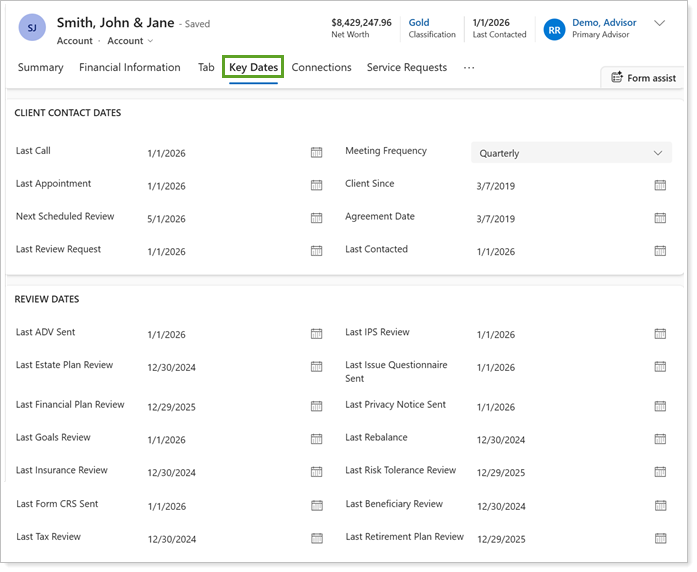
The following key dates are available on account records:
| key date type | Field Name | What it helps you track |
|---|---|---|
| Client Contact Dates | Last Contacted | When you last connected with the client so you can plan timely follow‑up. |
| Last Call | The most recent phone conversation with the client so you know when a follow‑up call may be needed. | |
| Last Appointment | When you last met with the client, whether virtually or in person, to maintain consistent engagement. | |
| Last ADV Sent | When the last ADV letter was sent to the client to meet compliance delivery deadlines. | |
| Last Privacy Notice Sent | When your firm's privacy notice was last provided to the client to meet compliance delivery deadlines. | |
| Last Form CRS Sent | When your firm’s Form CRS was last provided to the client to meet compliance delivery deadlines. | |
| Meeting Planning | Meeting Frequency | How often the client is typically scheduled for meetings, so you can proactively plan outreach. |
| Next Scheduled Review | When the next client review is scheduled in the future so you can prepare in advance. | |
| Last Review Meeting | When a review was last requested from the client to support timely scheduling and communication. | |
| Next Review Meeting Target | When you should target the next client review meeting based on their meeting preferences. This is automatically calculated based on the Meeting Frequency and Last Review Meeting. | |
| Review Dates | Last Review Meeting | When the client had their last review meeting, so you can refer back for future auditing and scheduling needs. |
| Last Financial Plan Review | When the client’s financial plan was last reviewed to support ongoing planning conversations. | |
| Last Estate Plan Review | When the client’s estate planning information was last reviewed so you can identify when updates may be needed. | |
| Last Insurance Review | When the client’s insurance coverage was last reviewed so you can identify potential gaps or changes in coverage needs. | |
| Last Tax Review | When the client’s tax information or strategy was last reviewed so you can revisit tax planning as circumstances change. | |
| Last IPS Review | When the investment policy statement was last reviewed to confirm investment decisions remain aligned with the client’s objectives and risk profile. | |
| Last Risk Tolerance Review | When the client’s risk tolerance was last reviewed to ensure you revisit risk planning over time. | |
| Last Goals Review | When the client’s goals were last reviewed to ensure recommendations stay aligned. | |
| Last Beneficiary Review | When beneficiary information was last reviewed to support accurate estate planning. | |
| Last Retirement Plan Review | When the client’s retirement plan was last reviewed so you can ensure it remains aligned with their long‑term goals. |
Note
Foundational client relationship dates, such as Client Since and Agreement Date, are located on the account’s Summary tab.
Review key dates for leads
Lead key dates help you track milestones early in the client lifecycle, before a prospect becomes an account. These dates provide visibility into engagement, qualification, and conversion activity.
Use lead key dates to:
-
Track prospect engagement over time.
-
Identify stalled or inactive leads.
-
Support consistent follow‑up during the sales process.
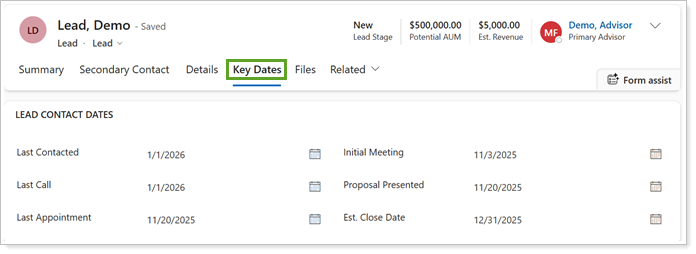
The following key dates are available on lead records:
| Field Name | What it helps you track |
|---|---|
| Last Contacted | When you last connected with the prospect so you know when follow‑up may be needed. |
| Last Call | The most recent phone conversation with the prospect so you can plan next steps. |
| Last Appointment | When you last met with the prospect, whether virtually or in person, to maintain engagement. |
| Initial Meeting | When the first meeting with the prospect took place so you can gauge progress early in the relationship. |
| Proposal Presented | When a proposal was presented to the prospect so you can time follow‑up and decision discussions. |
| Est. Close Date | Your best estimate of when the prospect is expected to become a client so you can prioritize outreach and pipeline activity. |