
Contents
Set up partially unmanaged securities
What's changing
When a client holds more of a security than your model calls for, such as a concentrated stock position or holdings subject to tax lot constraints, you may want to exclude some shares from trading. Previously, managing the whole position could generate unwanted sell recommendations, while unmanaging the entire position removed the model target for all shares.
With this release, you can restrict a portion of a security position as a partially unmanaged security restriction while continuing to manage the remainder of the holding. Specify the unmanaged amount as shares, dollars, or a percent of the position. During a rebalance, only the managed portion is considered for trading.
Partially unmanaged amounts process the same way as fully unmanaged securities. Only the account’s initial holdings are adjusted, so cash reserves and other account metrics are calculated as they would be if you had fully unmanaged the same amount.
You can:
-
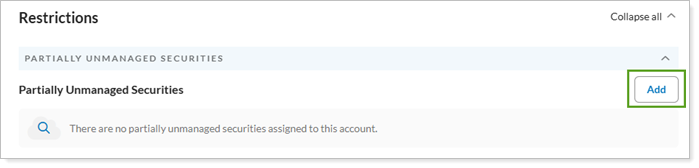
Designate partially unmanaged amounts one account at a time. Use the new Partially Unmanaged Securities section on the Restrictions tab to add them.
-
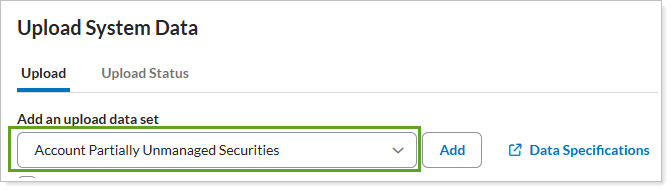
Designate partially unmanaged amounts to multiple accounts at once. Use an upload to apply these settings in bulk.
-
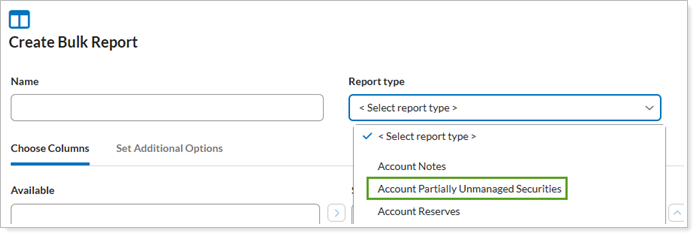
See your partially unmanaged designations in bulk reports.. Select the Account Partially Unmanaged Securities report type.
-
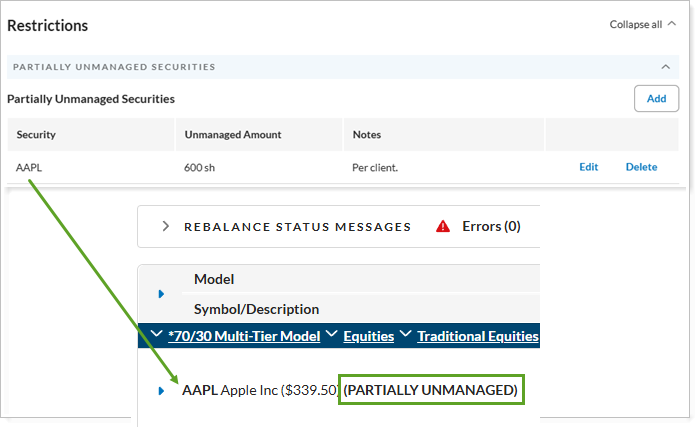
See partially unmanaged securities in trading results. View these securities in the Rebalance Summary and Trade List.
Example
Your model calls for 400 shares of AAPL, but a client holds 1,000 and wants to retain the additional 600.
Before: If you managed all 1,000 shares, the rebalance identified AAPL as overweight and proposed sells you had to override. If you unmanaged all 1,000 shares, you had to build an alternate model set without AAPL.
Now: You designate 600 shares as unmanaged. Rebalancing considers only the remaining 400 shares for trading, so AAPL no longer appears overweight relative to your model.
Why you'd use it
Partially unmanaged securities let you accommodate client-specific holdings without changing your models or repeatedly overriding trades. You can exclude part of a holding from drift calculations and trade recommendations, helping prevent unwanted sells while reducing the need for alternate models. Tamarac Trading processes the unmanaged portion like other unmanaged securities, keeping calculations consistent.
How to get started
This feature is available for all trading-enabled firms. You can designate partially unmanaged securities for individual accounts or upload designations for multiple accounts.
For more information and steps, see Add a partially unmanaged security restriction.