Contents
|
Show or Hide Order Instructions on the Rebalance Summary Report (FIX Flyer) |
Show or Hide Order Instructions on the Rebalance Summary Report (FIX Flyer)
For those of you who use FIX Flyer, we’re excited to introduce an improved functionality to assist with entering order instructions. With this release, if you are enabled for FIX Flyer and have a broker with order instructions, the new Order Instructions toggle allows you to show or hide the order instructions by default on the Rebalance Summary page.
With these updates, you'll see the following:
- Show or hide order instruction columns. At different stages of your trading workflow, it can be helpful to have the order instructions columns collapsed. With this release, you will be able to collapse the order instruction columns on the fly, and you will be able to define default behavior for the order instruction columns being expanded or collapsed.

- Set the default view for the Report Summary. Order instruction columns are collapsed by default, but the new Order Instructions toggle lets you configure your preference.

For more information, see Show or Hide Order Instructions on the Rebalance Summary Report.
Enhanced Hard Restrictions
Your clients may want to avoid trading certain securities. Respecting those requirements in your trades is an important part of your business. That's why we've introduced the powerful enhancement that adds new global security restrictions to Tamarac Trading. With this update, you can set up the following global restrictions that cannot be overridden in the trading workflow:
To apply these restrictions, you can use multi-edit or upload. If you shouldn't trade a security through Tamarac Trading, when adding a restriction to a security, set it as Hard Restriction.
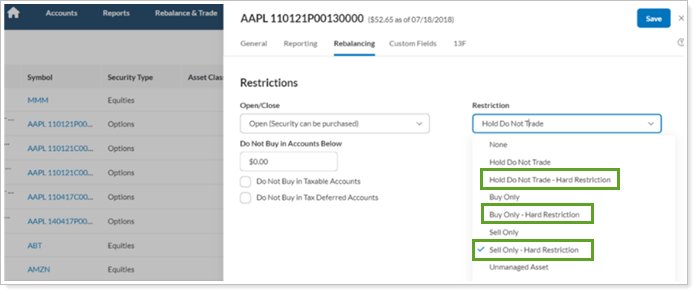
To track these new trade restrictions, use the following tools:
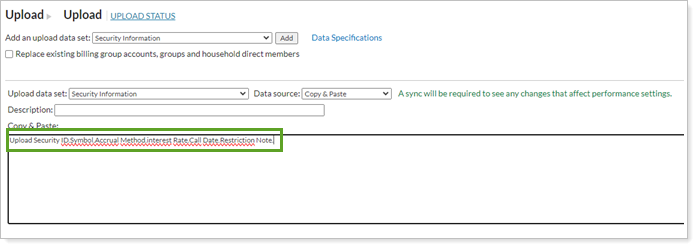
- Restriction notes. Upload Restriction Notes, which will show on the Rebalance Summary. These Restriction Notes will work for all global restrictions, not just the new Hard Restrictions.
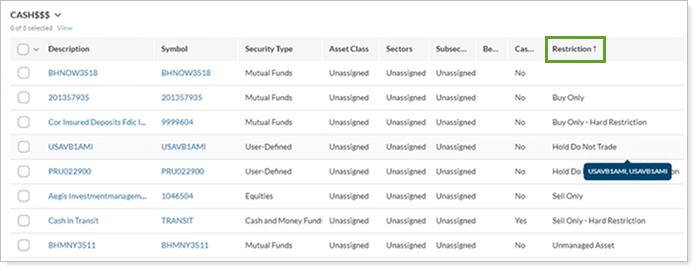
- Sortable Restrictions columns. To help you manage hard restrictions effectively, the Security and Rebalance Summary pages display your hard restrictions in the Restrictions column, which is now sortable. The Restrictions note column will show additional notes for your review. These columns appear when you export the page to CSV.
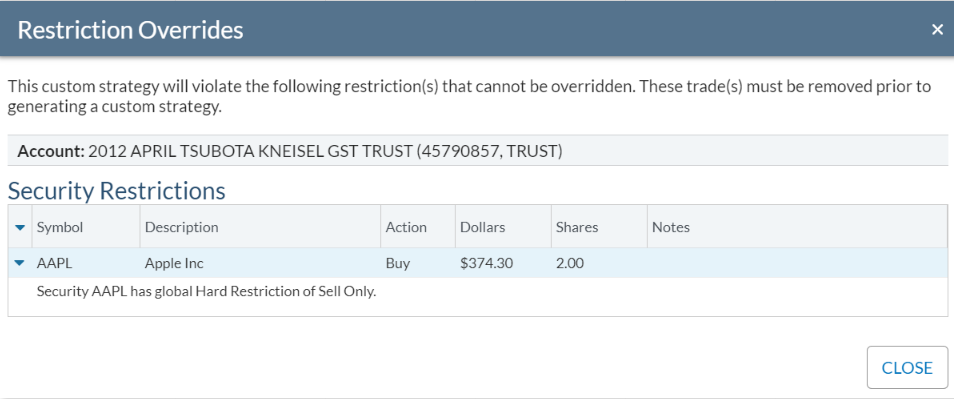
- Alerts throughout the platform.In the same vein, we’ve also added messaging to let you know when a trade violates a hard restriction. These alerts allow you to adjust your strategy to respect the hard restriction before generating a custom strategy.