
If established, As of date produces bulk report data using the date you set. This allows you to see details for a specific date or date range, such as the holdings within your accounts on a specific date.
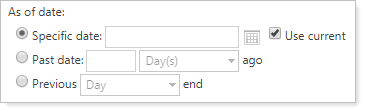
Your options are:
-
Specific date. Use the date selector or type in the date you want to generate the bulk report data for. If you select Use current, the it disables the date selector and uses today's as-of date.
-
Past date. Enter a number in the field, then choose whether it should pertain to days, months, or years ago. For example, if you want to run the report for 18 months ago, you'd enter 18 and select months.
-
Previous. Select to run the report for the previous day, month, quarter, or year-end. For example, if it's June 2026 and you choose Year, the report data will generate for December 31, 2025.
For more information about as of date in reporting, see As of Date.
For more information on bulk reports, see Understanding Bulk Data Exports.