
Generate equity trade file appears on the Trade Actions dialog box on the Trade List page when you create trade files or send trades to FIX Flyer for execution, and then log those orders. When you select this option and then select a trade file from the available list, Tamarac Trading will generate that trade file for the equities trades you've selected.
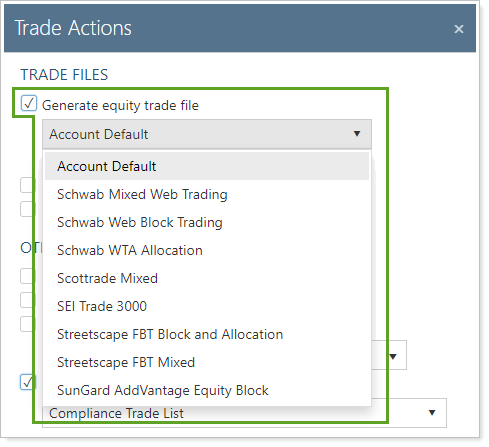
If this list is overly long, you can shorted it to only include select trade files. For more information on how to do this, see Filtering Trade File Formats.
Best Practices
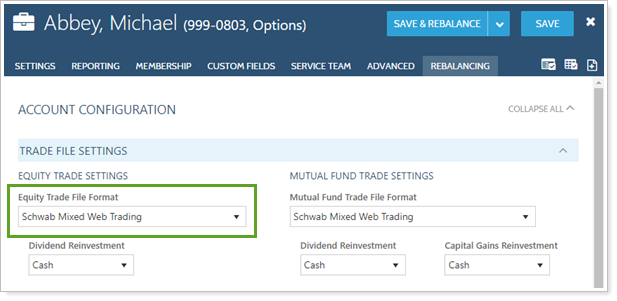
- Select Account Default to use the trade file established in each account's Equity Trade File Format Setting. This ensures that, if different accounts have different custodians, Tamarac Trading chooses the correct trade file for you.
- To save you time and possibly reduce errors, Tamarac Trading lets you choose your default settings for the Trade Actions dialog box on the Rebalancing System Settings page. Select your preferred settings here before generating trade files or sending trades to the custodian or FIX Flyer for execution.
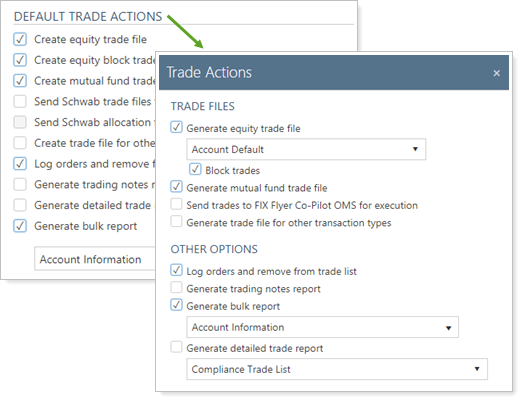
For more information on generating trades and the Trade Actions dialog box, see Create Trades and Log Orders.