
Contents
|
Clients - Negative Contribution Rate Compliance - Clients Added This Year Compliance - Clients Terminated This Year Financial Accounts - Closed in Tamarac Reporting |
Introduction
Tamarac CRM offers various system views, designed to provide you access to client information that is already filtered and organized with common administrative and strategic criteria in mind.
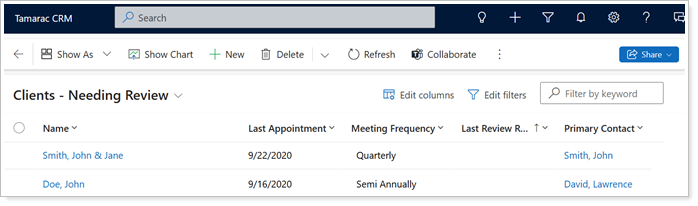
This article covers more information on the system views in Tamarac CRM.
System Views
As you navigate across Tamarac CRM, there are many system views that allow you to review specific data.
The following system views are available in Tamarac CRM:
My Activities
This view shows a list of activities that meet all the following criteria:
-
Activity Type is not a quick campaign, and...
-
Activity status is open or scheduled, and...
-
Activity party is equal to the current user. This would be you. Depending on the type of activity you are looking at, the activity party will include:
- TASK.Activity party includes the Regarding and Owner fields.
- APPOINTMENT.Activity party includes everyone in the Regarding, Owner, Organizer, Required Attendees, and Optional Attendees fields.
- PHONE CALL.Activity party includes everyone in the Regarding, Call From, Call To, and Owner fields.
- EMAIL.Activity party includes everyone in the Regarding, From, To, Cc, Bcc, and Owner fields.
- LETTER.Activity party includes everyone in the Regarding, From, To, and Owner fields.
- FAX.Activity party includes everyone in the Regarding, From, To, and Owner fields.
Activities Delegated
This view shows a list of activities based on the following criteria:
-
Activity Type is a Task or Phone Call.
-
Activity status is open, scheduled, or completed in the last 7 days. Open activities must be due in the next 7 days or overdue.
-
Owner is not the current user.
-
Created by is the current user. This results in items that you have created for other people at your firm.
The list will be sorted by Due Date. This ensures that you can quickly see items that are past due so that you can open it up to read any updates left by the owner. If no notes have been added, you would want to Ping! your coworker to get an update.
Since you will see both open and completed activities on this list, we have added the Activity Status column. As your team works on the activities that you have assigned them, you will see the status change. This eliminates the need to walk to their desk for an update. Once the status changes to completed, you can open the activity to read the notes.
Completed activities will leave this view after 7 days.
Activity Associated View
All Activities associated to a specific record.
Clients - Needing Review
All clients who need to be contacted to schedule a review. This view looks at your accounts based on the following criteria:
-
Account type is household and...
-
Account status is active and...
-
Last appointment is older than meeting frequency—for example, meeting frequency is annual and last appointment is older than 12 months.
-
Any accounts where last appointment, meeting frequency, next scheduled review, or last review request are blank.
Clients - Needing Contact
It's important to check in with your clients at least once per quarter. Tamarac CRM makes it easy for you to see which clients you need to reach out to with the Clients – Needing Contact view. This view gives you a snapshot of clients you haven't spoken with since last quarter. Some clients may have a review meeting that coincides with their next touch base; these clients will be removed from the view when you enter a Last Review Request date. This view looks at your Accounts based on the following criteria:
-
Account type is household, and...
-
Account status is active, and...
-
Last contacted is older than 3 months or last review request is older than 1 month.
Client Birthday View
Many clients choose to send correspondence to clients on their birthday. Use this View or the Birthday Report to manually monitor when birthdays are coming up or use Processes that will create a Task to alert you of an upcoming birthday.
You can use the Client Birthday view to find upcoming birthdays for clients within the next three months. This view looks at your contacts based on the following criteria:
-
Contact status is active, and…
-
Contact next birthday is in the next three months, and…
-
The contact is associated to an account with an account type of household.
Clients - Active
Active Accounts with a Type of Household.
Clients - Negative Contribution Rate
Allows you to easily identify whether any of your accounts are at a negative contribution rate. You can find this view on the Financial Accounts page.
Compliance - Clients Added This Year
Provides a list of all the clients you added for the current year. You can find this view on the Accounts page.
Compliance - Clients Terminated This Year
Provides a list of all the clients that were terminated for the current year. You can find this view on the Accounts page.
Financial Accounts - Closed in Tamarac Reporting
Active Financial Accounts with a Closed Date in CRM.
Create Views from Record Pages
While many system views may already provide the information you need, you might occasionally wish to customize how the data is displayed. When viewing a system view on a record page, you have the ability to adjust the view according to your preferences and save the modifications as a new custom view.
Example
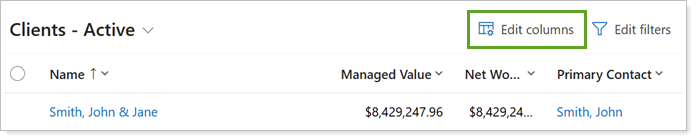
Although you commonly use the Clients - Active system view, you might prefer to see the Secondary Contact for clients listed in the view columns.
While you are in the Clients - Active system view, you can select Edit columns to add Secondary Contact.
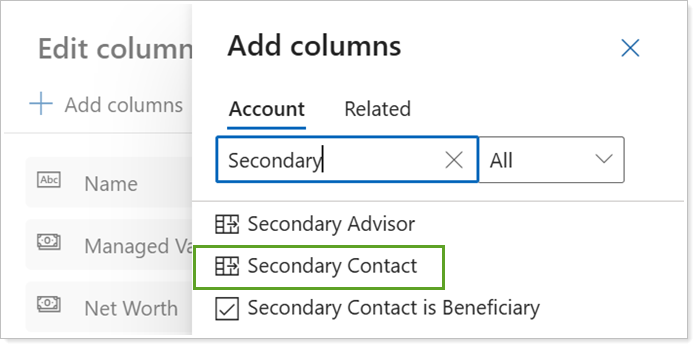
Once you're done making your column changes, you can Save as new view.
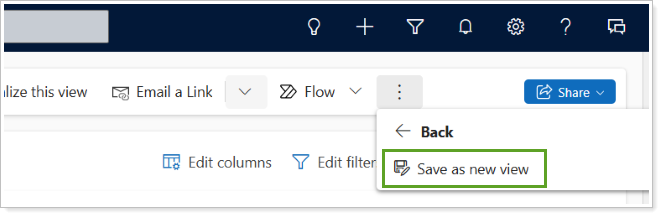
For more information, see Search on Record Pages.
Create Custom Views with Advanced Finds
Advanced Find offers more expansive search capabilities, allowing you to perform more complex and tailored searches based on multiple criteria in CRM. Although you can create custom views from Advanced Find starting from scratch, you can alternatively start from existing system or personal views and use the criteria to help simplify the process.

For more information, see Custom Views and Advanced Finds.