
Contents
|
Workflow Steps: Transition an Existing Tamarac Account to TUMA |
Introduction
With Tamarac’s Envestnet Unified Managed Account (TUMA) integration, you can seamlessly transition existing Tamarac accounts to Tamarac UMAs through the Envestnet Proposal tool.
This topic provides steps to create a new proposal in Envestnet to transition one or more existing Tamarac accounts to a Tamarac UMA on Envestnet.

For more information about this integration, see Envestnet Unified Managed Account Integration.
For assistance, contact Tamarac Account Management at TamaracAM@envestnet.com.
Workflow Steps: Transition an Existing Tamarac Account to TUMA
|
|
1. |
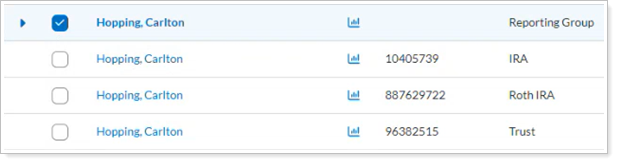
Select Accounts and Launch Proposal To select the Tamarac account(s) or group you want to transition to Envestnet UMAs:
|
|
|
2. |
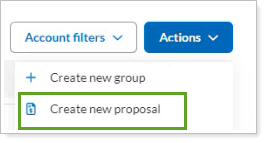
To create a TUMA-specific proposal:
|
|
|
3. |
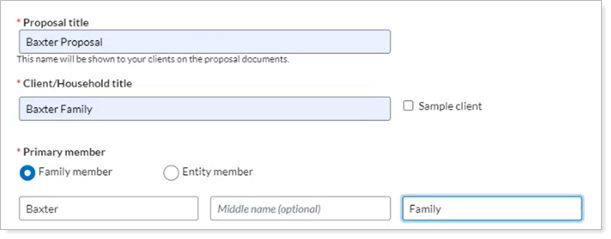
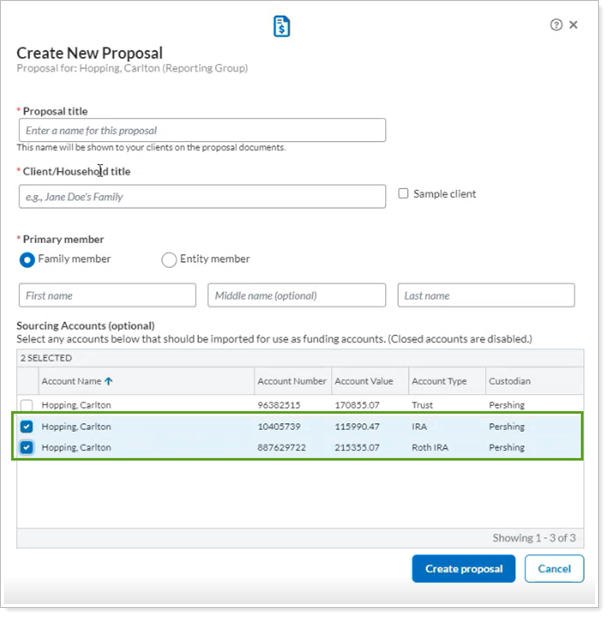
Set up the Proposal with the specific configuration to create Tamarac Unified Managed Accounts. You must complete each step in the Proposal tool to initialize the TUMA accounts and to generate the Statement of Investment Selection (SIS) on Envestnet. |
|
|
4. |
Promote a Proposal to In Good Order > The proposal must be in good order (IGO) before you can complete the process. Use these steps to make sure the proposal is IGO. |
|
|
5. |
Upload the Signed Statement of Investment Selection (SIS) to Envestnet Select Upload SIS and follow the steps to upload the signed Statement of Investment Selection (SIS) to Envestnet. |
|
|
6. |
Add the Custodian Details to Envestnet To add the custodian details:
|

Next Steps
Once you’ve established Tamarac UMAs, you administer them on the Envestnet platform. You can:
-
Create new proposals, review TUMA proposals, and modify existing proposals.
-
Build and maintain UMA models.
-
Request to trade TUMAs.
For more information, see Manage Tamarac UMAs on the Envestnet Platform.