
Contents
Introduction to Selective Sync
Unlike a firm-wide data sync, Selective Sync lets you update only specific client accounts. You might do this:
-
After making single-account changes.
-
When managing time-sensitive requests.
-
To avoid unnecessary processing.
This option gives you greater control over updates and ensures you only sync the data you need for your clients.
Run a Selective Data Sync
To run a selective sync, follow these steps:
-
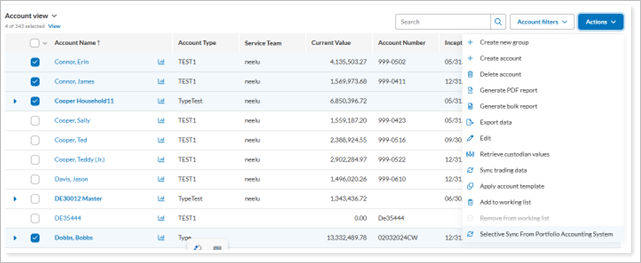
From Account view, select one or more accounts to sync.
-
In the Actions menu, choose Selective Sync from the Portfolio Account System.
-
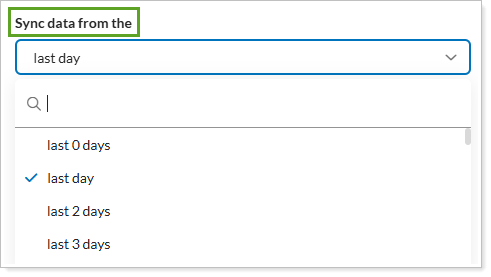
Choose the Sync data from time period you would like.
-
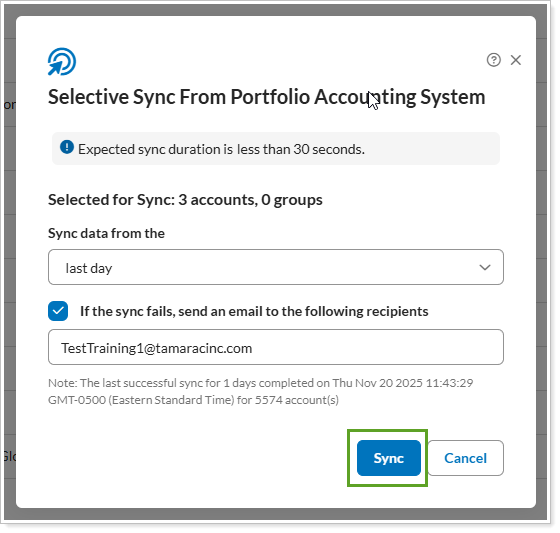
If you would like to receive a sync failure notification, select the If the sync fails, send an email to the following recipientscheck box and type the email address you want to use.
-
In the Selective Sync From Portfolio Account System panel, confirm the details for your request and select Sync.
Notes
By default, only Site Admin users have permission to run a selective sync. You can add permissions for other roles if you choose. See Manage Permissions for Roles for more details.