
Contents
Introducing Modernized Rebalance, Rebalance Summary, and Spreadsheet View Pages in Tamarac Trading
Through the years, we’ve introduced Tamarac Trading improvements that are built with traders in mind. As time has gone by, we've continued to introduce new features and workflows to optimize your trading experience, while continuing to support the original tools.
With this release, we're combining and sunsetting some of the original Trading pages, while enhancing the design on the updated pages. After this release, you'll see these changes:
Rebalance - replaces Classic Rebalance and Rebalance Review
Spreadsheet View - replaces Trade Summary
With this release, we’re thrilled to announce that we’ve enhanced the following Trading pages:
-
Rebalance and Rebalance Summary
-
Spreadsheet View
Read on to learn more about our exciting page updates.
Rebalance page makeover
You start your trading workflow on the Rebalance page. With this release, we’ve introduced a new design to make your workflow even more intuitive.
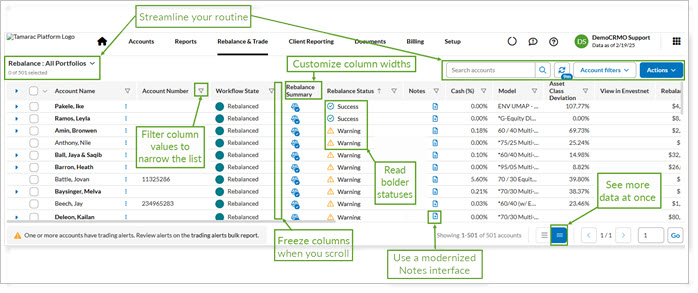
You’ll benefit from our new Rebalance page design in the following ways:
-
Streamline your routine. View management, search options, account filters, and page actions are all grouped intuitively to allow more efficient workflows. The new locations simplify your daily actions and leave more room for you to work with data.
-
Customize column widths. Permanently set column widths and wrap header names in your view. This exciting feature allows you customize column widths once and keep the setting, so you can fit more data onscreen.
-
Filter more types of column values. We know the Rebalance page displays many entries. To help you identify and focus on the values that matter to you, we’ve enhanced column filtering to include ranges and text values.
-
Freeze columns. Keep the context of important information to the left as you scroll right horizontally. You decide which columns to pin to the left.
-
See more data at once. The new look defaults to a compact view, maximizing vertical space and showing you more entries at once.
-
Read bolder statuses. The rebalance status indicators stand out boldly now, so you’ll quickly recognize when to take action on an account.
-
Manage Notes. We’ve updated the look and feel of the Notes popup. You can scroll to see past notes, search for notes, add notes, and more.
Rebalance Summary makeover
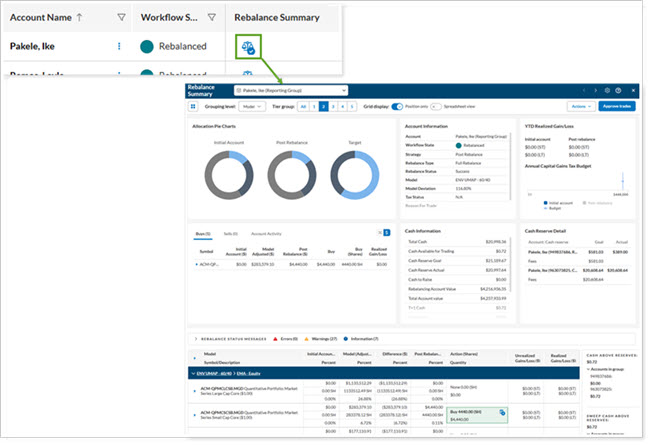
To view rebalancing impact on an account, from the new Rebalance page you’ll access the new Rebalance Summary page. The modernized look presents the same account details in a cleaner, more compact format.
Spreadsheet view modernization
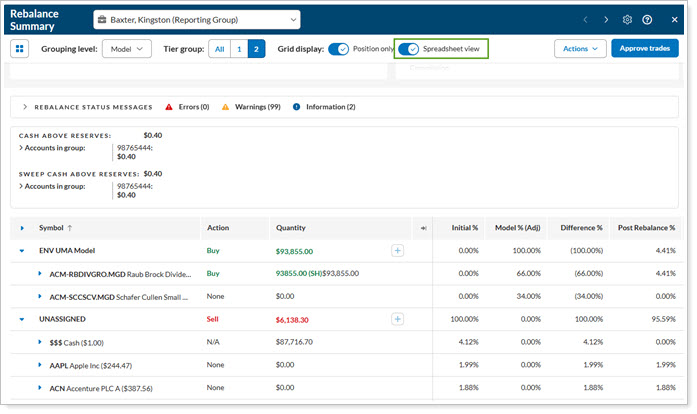
You’re in a better position to help your clients when you can see their situation more clearly. Spreadsheet view now has a cleaner, easier to read look so you can see the impact of proposed trades at a glance.
Sunsetting Classic Rebalance, Rebalance Review, and Trade Summary Pages in Tamarac Trading
To support ongoing Tamarac platform advancements, we’ll retire some Trading pages with this release. Consult the chart below for more information.
| this page is retiring | ...Use this page instead | ...here's how |
|---|---|---|
| Classic Rebalance |
Rebalance
Over time, most users have switched to the Rebalance page to as the start of their trading workflow.
This release, we retire the Classic Rebalance page and introduce an upgraded Rebalance page. |
For the steps to use the upgraded Rebalance page, see Start the Rebalance Process. |
| Rebalance Review |
Rebalance
In the past, you may have visited Rebalance Review to approve trades, add or update order instructions, place trade holds, and more. Over time, most users have switched to the Rebalance page to efficiently perform these actions.
This release, we retire the Rebalance Review page and introduce an upgraded Rebalance page. After you start the rebalance process, stay on the Rebalance page to work effectively across accounts. |
For the steps to use the upgraded Rebalance page, see Start the Rebalance Process. |
| Trade Summary |
Spreadsheet View toggle in the Rebalance Summary
After a rebalance, you may have visited Trade Summary to review and approve proposed trades. Over time, many users have switched to Spreadsheet View to complete these tasks.
This release, we retire the old Trade Summary page and introduce a modernized, streamlined Spreadsheet View to do tasks you previously completed on the Trade Summary page. |
For the steps to use the modernized Spreadsheet View, see Spreadsheet View. |
In the past, you may have accessed a previous version of a page from the new version of the page. With this release, we’re removing access to previous page versions.
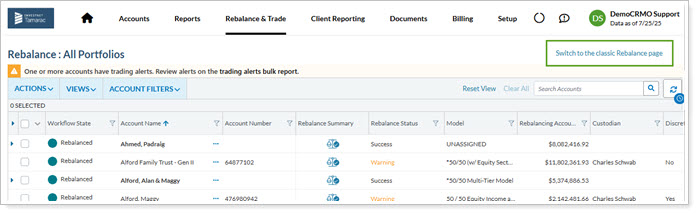
Using the most up to date version of a page ensures that you have the best experience possible.
For more information about pages in Tamarac Trading, visit the Tamarac Support & Training Center and Tamarac University.
Learn More - Watch the Release Video
To see the new Rebalance and Rebalance Summary pages in action, watch this video: