
Contents
|
Customize the columns you see in the Rebalance Summary Spreadsheet View |
Customize the columns you see in the Rebalance Summary Spreadsheet View
What's Changing
The Rebalance Summary Spreadsheet View now allows you to customize which columns appear and how they’re arranged, giving you more control over the information displayed.
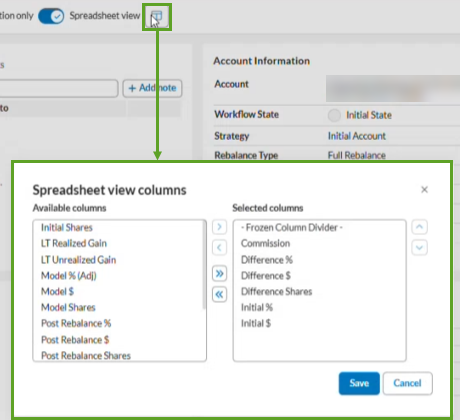
You can now:
-
Freeze key columns. Pin important columns to the left side of the grid so they remain visible while you scroll.
-
Sort column values. Sort data in ascending or descending order.
-
Reorder columns. Quickly reorder the column set from left to right to see columns on the next page.
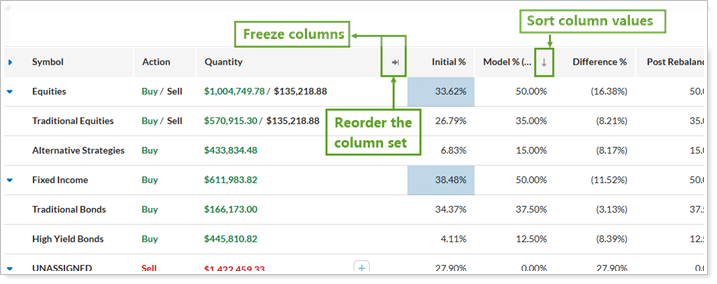
Tamarac automatically saves your column layout and restores it the next time you sign in, even if you use a different browser or device.
Why You'd Use It
Customizing the spreadsheet to match your workflow saves you time, makes it easier to find key trade information, and lets you quickly analyze rebalance results without leaving the Rebalance Summary page.
Get Started
If you have access to the Tamarac Rebalance page, the new column customization features are available automatically. Open Rebalance Summary Spreadsheet View to begin arranging and saving your preferred column layout.
More Information
For more information:
-
On how to use Spreadsheet View, see Spreadsheet View.
-
About how to work with columns in Tamarac Trading, see:
Add, Remove, and Rearrange Columns on Trading Pages
Sort and Filter Columns on Pages in Tamarac