
Contents
Selective Sync and Smart Publish now update Trading
What's changing
Selective Sync and Smart Publish bring the latest account holdings from your portfolio accounting system into Tamarac, either on your daily schedule or when you run manually intra-day. This release enhances how the platform posts holdings updates to Tamarac Trading:
-
First publish of the day. The publish syncs all accounts to Reporting and Trading, as happens today.
-
Subsequent intra-day syncs with Selective Sync, Smart Publish. To update holdings in Trading, keep the new Export to Tamarac Trading after import setting checked when you run a Selective Sync from the Accounts page.
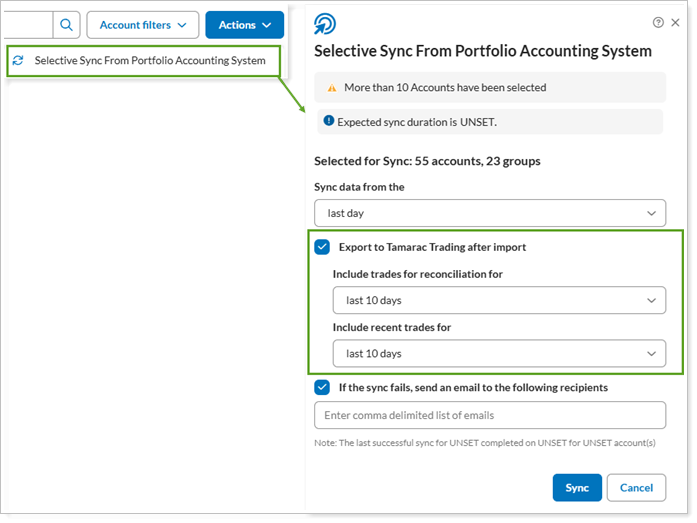
When you keep this setting checked:
-
Accounts in the initial state receive their new Trading holdings as part of the publish.
-
Accounts in the rebalanced state or with pending trades won't receive new Trading holdings.
-
A rebalancing group updates only if every account in it is untouched.
-
See and update outdated holdings from the rebalance page
On the Rebalance page, you can now find accounts with outdated holdings, where current Reporting holdings haven't updated to Trading:
-
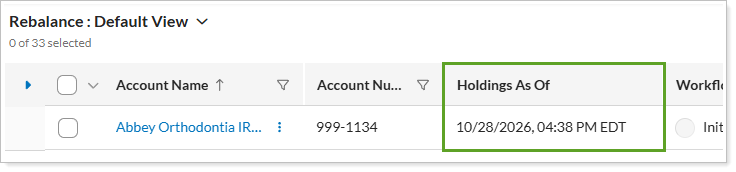
A new Holdings As Of column shows each account’s last update time. If an account did not have current Reporting data at the first publish, you’ll see a stale as of date.
-
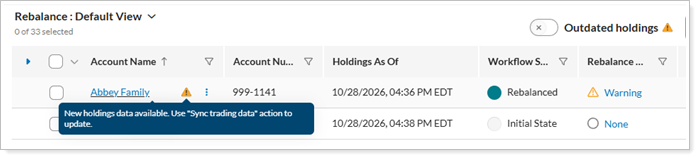
A warning message and an Outdated holdings filter for rebalanced accounts and groups with new data available.
-
A banner in Rebalance Summary shows when updated holdings become available after you've rebalanced an account.

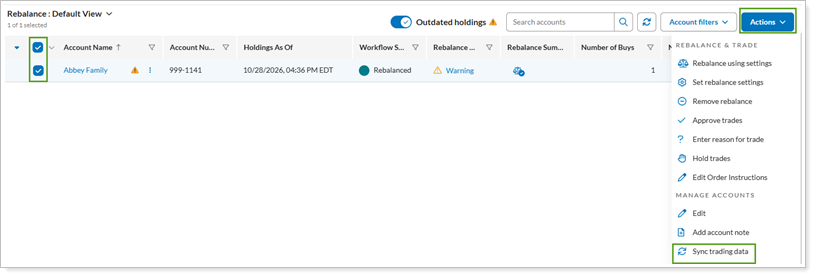
To update accounts with outdated holdings from the Rebalance page, set the Outdated holdings filter. We've added the existing Sync trading data process to your Actions list. Select the accounts you want to update and choose that action.
Why you'd use it
Rebalances use up-to-date holdings, so trade sizes and cash reflect what’s actually in the account. You can easily list your in-progress accounts with outdated holdings and update them when you’re ready.
How to get started
This feature automatically applies to firms using both Tamarac Reporting and Tamarac Trading.
For more information about how to use the Rebalance page with this feature, see Rebalance Page Actions, Views, and Filters.
For more information about publishing, see: