
To route orders on trading files with the appropriate trade order details, Tamarac Trading assigns a Trading Security Type setting to each security on the platform. This setting is an important part of trading and trade routing. In your new security setup workflows, your firm should incorporate a process to check that it’s correctly configured and, if necessary, override the Tamarac value.
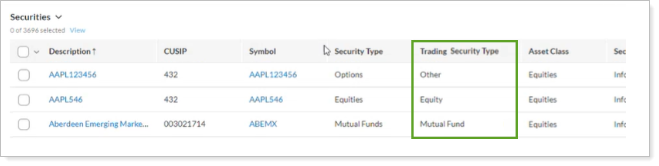
Tamarac Trading automatically assigns each security a default Trading Security Type based on its Reporting Security Type. The following are available default Trading Security Types:
-
Equity
-
Exchange Traded fund
-
Mutual Fund
-
Other (examples: Fixed Income, Options)
-
Cash
-
Envestnet Managed
Optionally, you can specify the Trading Security Type when you create new securities in your Tamarac site manually or by bulk upload. If you don’t, Tamarac automatically assigns a default value based on the security’s Reporting Security Type. For trade routing, a security’s available Trade File Group Settings display according to its Trading Security Type.
For more information about creating securities manually, see Add and Maintain Securities.
For more information about bulk uploading securities, see Understanding Bulk Data Uploads.
For more information about how to configure Trade File Group Settings for trade routing, see Trade File Group Settings.