
Contents
How Use Intraday Pricing Works
| Applies to: | ||
|---|---|---|
| ✔ Dynamic | Client Portal | |
With this setting enabled, you will see intraday prices in Tamarac only delayed by 15 to 20 minutes for U.S. equities and ETFs listed on U.S. stock exchanges, including NASDAQ, NYSE, NYSE Alternext, and over-the-counter exchanges.
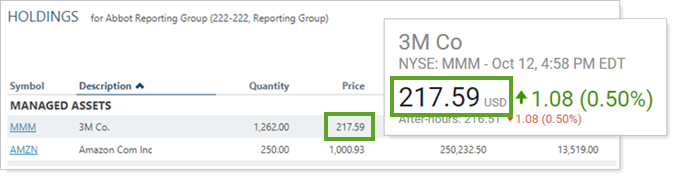
You might choose to use this when making immediate trading decisions based on Holdings report data.
For more information, see Intraday Pricing.
Enable Intraday Pricing
You must request to have this feature enabled. If you want to enable intraday pricing, contact Account Management at TamaracAM@envestnet.com.
In Dynamic Reports

-
To use intraday pricing, select Use intraday pricing (15 min. delayed).
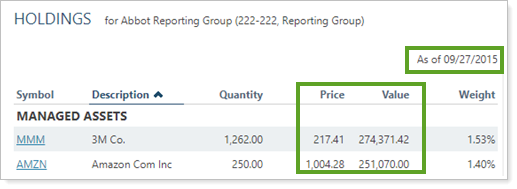
In this example report, the Use intraday pricing check box is selected, which locks the As of Date to Last Market Close. The current date, shown in the menu, is 9/27/2015 and the report data date is 9/27/2015. All price-related data are based on intraday pricing.
-
To use a historical as of date, clear Use intraday pricing (15 min. delayed) and select the desired date.
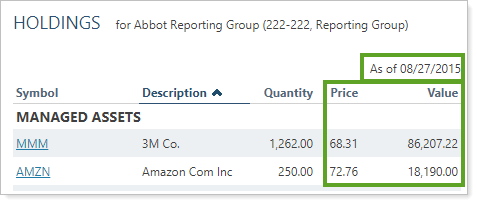
In this example report, the As of Date is set to one month before the current date. The current date, shown in the menu, is 9/27/2015 and the report data date is 8/27/2015.
Intraday pricing updates for the following columns:
-
Current Value
-
Long-Term Gain/Loss
-
Short-Term Gain/Loss
-
Percent Gain/Loss
-
Total Gain/Loss
-
Intraday Price Change
-
Intraday Price Change Percent
-
Intraday Value Change
In PDF Reports
This setting is not available for PDF reports.
Reports With This Setting
Holdings Reports
Related Settings
For more information about the as-of date, see As of Date.