
Contents
Introduction
When configured, data feeds from alternative investment platforms like CAIS and iCapital flow into Tamarac Reporting through system-created manual security snapshots. Tamarac automatically updates these manual security snapshots with data from the provider daily.
Unlike standard custodian data feeds, snapshot-based alternative investment data feeds don’t go through Tamarac’s daily reconciliation process. Because of this, it’s important to monitor the data regularly to help ensure accuracy and consistency.
This page provides information about ways to monitor your alternative investment data feeds. It is also the final step in the Workflow: Set up data feed for alternative investments in Tamarac.

For more information about alternative investments in Tamarac and details on which providers support this integration, see Introduction to alternative investments.
Monitor with custom views
Custom views use bulk reports to display an interactive, filterable tables of your snapshot-based alternative investment data. This helps you monitor data uniformity, identify stale valuations, and spot outliers, like accounts with unexpected performance.
Custom views can help you answer questions like:
-
Are valuation updates stale?
-
Is the data uniform?
-
Are there any outliers?
To monitor your data, first create bulk reports and then use them to generate a custom view. The following sections are two examples of bulk reports and columns that can help you identify outliers and validate data quality.
For more information about custom views, see Custom Views and Create, Copy, or Delete Custom Views.
Account Committed Capital bulk report
Use the Account Committed Capital bulk report in a custom view to compare holdings for accuracy.
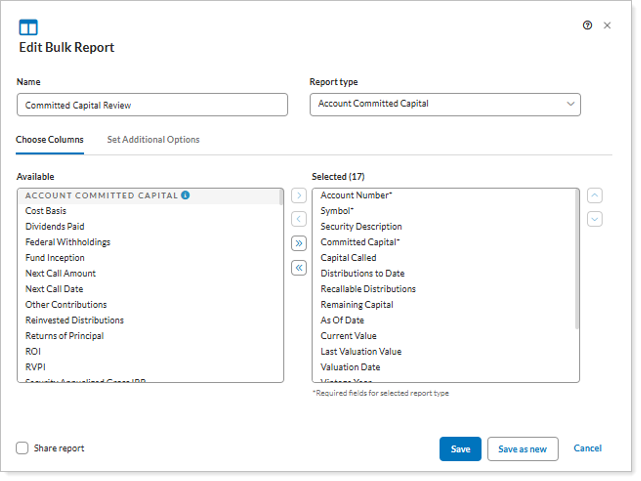
In the bulk report, add the following columns:
|
|
|
Under Set Additional Options, configure the following:
-
As of date: Set to the date you'd like to review.
-
Account - Aggregate date period: Set to All.
-
Exclude or Include Only records involving these securities: If desired, filter for the securities you want to review.
When you use this bulk report in a custom view, it looks like this:

Manual Security Snapshots bulk report
Use the Manual Security Snapshots bulk report in a custom view to review snapshot activity, historical changes, and data maintenance details.
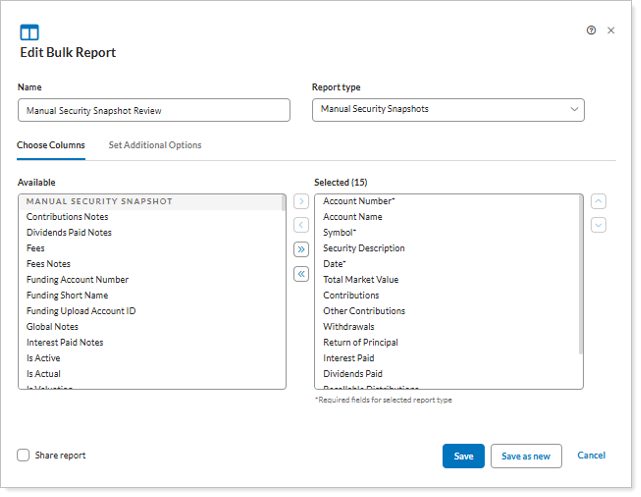
In the bulk report, add the following columns:
|
|
|
Under Set Additional Options, configure the following:
-
Date period: Set to the date range you'd like to review.
-
Exclude or Include Only records involving these securities: If desired, filter for the securities you want to review.
-
Include only: See deactivated snapshots, if desired.
-
Include snapshot history and Include history for deleted snapshots: See deleted snapshots, if desired.
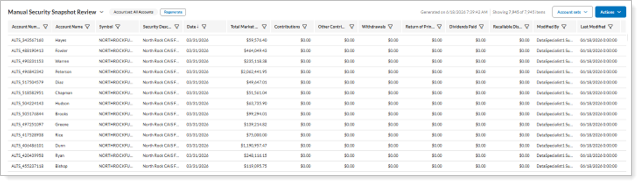
When you use this bulk report in a custom view, it looks like this: