
Contents
Introduction
The Canoe integration enhancement connects the Tamarac platform with Canoe, a leading provider for alternative investment data. This integration lets you initiate a data feed from Canoe directly into Tamarac, as well as access critical tax documents, such as K-1s and 1099s, for your associated with private-placement alternative investments.
This article provides details about the Canoe integration in the Tamarac platform.
For more information about other alternative investment provider integrations, see Introduction to alternative investments.
Enablement
Your firm must have the Canoe integration enabled to see the Canoe Tax Documents folder. To turn it on, contact your Tamarac Service team. For more information about setting up the data feed, see Workflow: Set up data feed for alternative investments in Tamarac.
There is no cost to configure access the documents once configured.
Before you start
For tax documents from Canoe to appear on the platform, the investment must be:
-
Associated with a valid Tamarac account. For help linking an investment to a Tamarac account, contact your Canoe representative.
-
A member of a Tamarac Household. For more information about adding an account to a Household, see Maintaining Accounts: The Household and Group Membership Panel.
Once you link the account and assign it to a Household, the system automatically maps and displays the Canoe tax documents in the document vault.
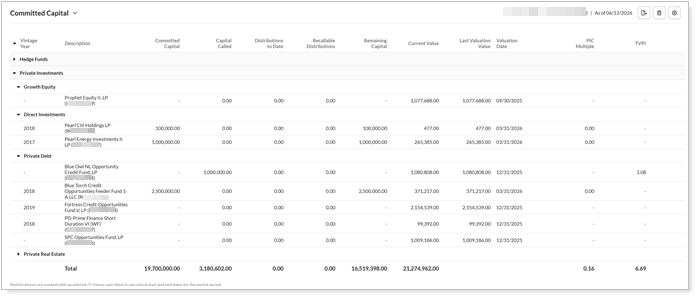
Use Canoe data in Tamarac Reporting
When managing your clients’ assets, you need to see and report on all your clients’ accounts and holdings in Tamarac Reporting, regardless of where the assets are held.
To bring in data about the alternative investments from Canoe, you can:
-
Export the data from Canoe and upload it to create manual security snapshots in Tamarac each time something changes.
-
Use Tamarac’s direct data feed with Canoe, which automatically creates and updates manual security snapshots.
Either method allows you to include Canoe alternative investment data in your standard reporting package.
For more information, see:
See Canoe tax files in the Tamarac document vault
Once the integration is enabled, you can see Canoe tax documents automatically in the Tamarac document vault. For more information about the document vault, see Use the Document Vault.
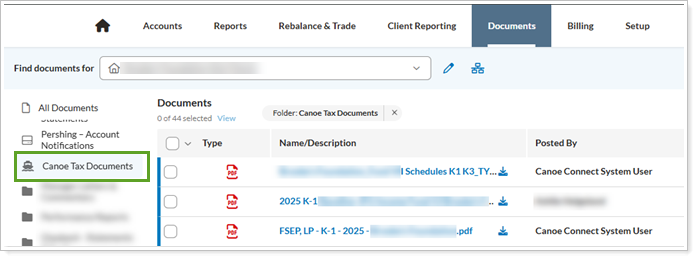
To access Canoe files in the Tamarac document vault:
-
In the Tamarac platform, under Documents, select Vault.
-
In Find documents for, select the client who has alternative investments in Canoe.
-
Select Canoe Tax Documents to see the tax documents for that client's accounts.
-
Optionally, select one of the documents and choose Download.