
Contents
Introducing Selective Sync
We know how important data syncs are to your business. These syncs update account and client details that are critical to daily operations. With this release, you can use Selective Sync to update specific client accounts without performing a sync for your entire firm. Because selective syncs calculate and insert less data than full syncs, they finish much faster.
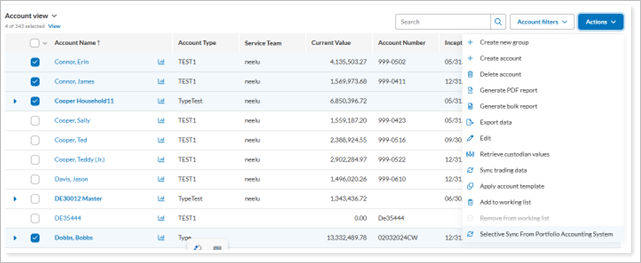
Whether you’ve added a new manual security snapshot that needs to appear in reports or want to refresh an account whose custodian data was not included in the morning sync, Selective Sync gives you more control over your data. It also helps ensure you have the most current information for your clients.
Updated Multi-Factor Authentication (MFA) Password Requirements
Keeping your data secure is of paramount concern to us. That's why with this release, we adjusted password requirements to encourage more robust password use. We have introduced a new layer of security for all users: Multi-Factor Authentication (MFA), sometimes called dual-factor authentication.
MFA requires both a password and a second verification method. In the past, some Tamarac users opted out of using MFA or relied only on challenge questions, which are less secure.
To continue protecting your data, Tamarac is introducing the following updates to the sign-in process:
-
MFA required for all users. Anyone signing directly into the Tamarac platform with a password must now use MFA. This applies when you sign into Tamarac and to your clients when they sign into the client portal.
-
Challenge questions replaced. Challenge questions are being phased out and replaced with email-based one-time passwords. One-time passwords are already available today and will become the default after the November release.
This change only affects users who sign in with a password and either use challenge questions or don't currently use MFA. If you already have SMS authentication enabled, no action is required.
For more information about multi-factor authentication in Tamarac, see Manage Dual Factor Authentication for Firm Users and Manage Dual Factor Authentication for Your Clients.
Introducing the modernized Trade Review page
We know you visit Trade Review to view proposed trades and implement strategies across your book of business. This release, we're excited to introduce the remodeled Trade Review page designed to make your trade review process faster and more intuitive.
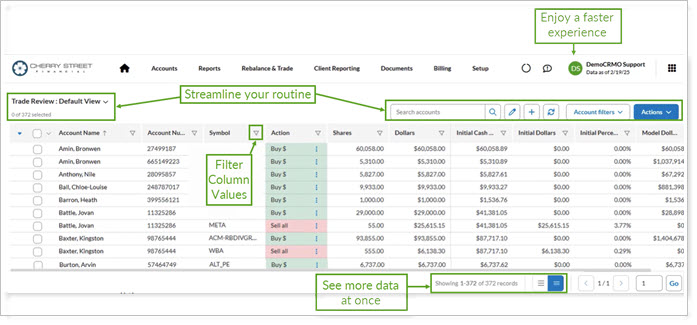
Read on to discover the ways you’ll benefit from the new Trade Review page design:
Enjoy a faster experience
We’ve upgraded the page’s processing capabilities to increase your speed as you perform tasks like editing trades and sorting columns.
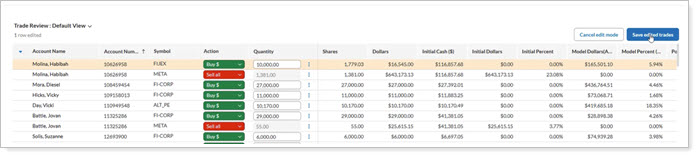
Streamline your routine
Find access points across the top of the page for view management, search options, account filters, and page actions. The new locations simplify your daily actions and leave more room for you to work with data.

See more data at once
The new look defaults to a compact view, maximizing vertical space and showing you more entries at once. Additionally, we’ve upped the page record view count from 100 to 1000 records so you can see more entries on a single page.
Filter column values
Trade Review holds many entries. We’ve enhanced column filtering for more types of columns so you can choose which values to focus on.
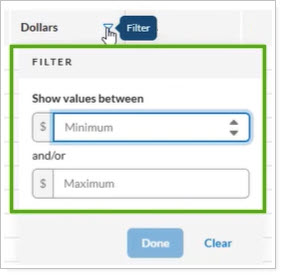
For more information about actions, views, and filters on the Trade Review page, see Trade Review Page Actions, Views, and Filters.
Experience remarkably faster load times on the Trades on Hold page
We’ve significantly improved the performance of the Trades on Hold page to support loading more than 500 trades—a key enhancement for firms managing high trade volumes.
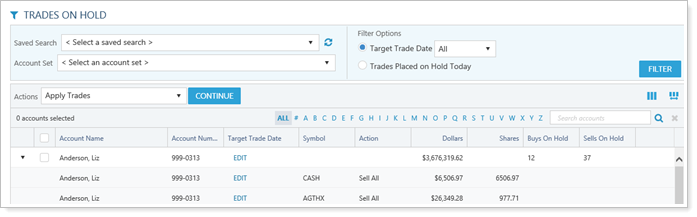
With this release, the Trades on Hold page:
-
Reliably loads when over 500 trades on hold are present.
-
Supports at least 1,000 trades, with scalability for 2,000+ trades to accommodate future growth.
This update ensures seamless access to all trades without manual filtering, even during peak activity.
For more information about how to use the Trades on Hold page, see Trades on Hold.
Introducing the Trading Dashboard makeover
The remodeled Tamarac Trading Dashboard gives you a comprehensive, intuitive overview of events and account details—including trading AUM, cash reserves, security details, and models—all in one place. It’s designed to bring clarity and efficiency to the start of your trading day, helping you focus on the information that matters most.
We’ve redesigned the dashboard to include:
-
Improved filters. Use Saved Searches, Account Sets, and Working Lists to instantly tailor the account-specific widgets for personalized insights.
-
Quick access to account lists. Press a button to view accounts that may need your attention.
-
Clearer charts, graphs, and fonts. Enhanced visual clarity helps you assess your book of business and identify possible trading actions.
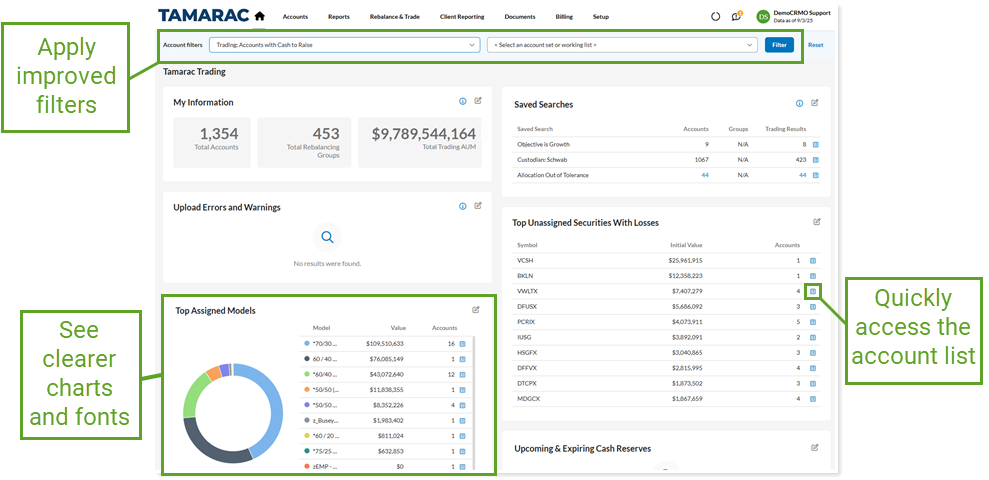
For more information on how to use the Trading Dashboard, see Learn more about the Trading Dashboard.
Intraday pricing is now managed from System Settings
When trading equities, using intraday pricing instead of the previous day’s end-of-day price lets you make decisions based on current market conditions. Access to timely data helps you trade more accurately and reduces risks from overnight market changes. Tamarac Trading provides intraday pricing data on a 15-minute delay for US equities and ETFs listed on US stock exchanges.
This release introduces a modernized real-time pricing microservice that improves scalability, performance, and reliability. The new architecture replaces legacy components and streamlines pricing operations across the platform.
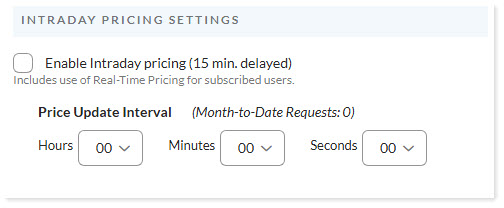
You’ll now find Intraday Pricing Settings in Firm Settings, under System Settings.
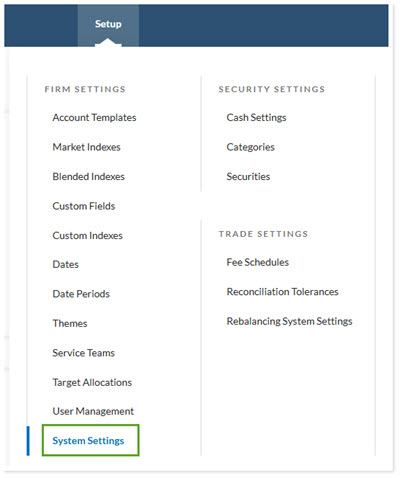
Previously, this configuration was available in Rebalancing System Settings. The move centralized configuration management and makes it easier to maintain firmwide settings.
To enable intraday pricing for your firm, contact Account Management at TamaracAM@envestnet.com. Once your firm is enabled, use Intraday Pricing Settings to turn on the feed and select your preferred update interval.
For more information about this feature, see Intraday Pricing.
Learn More - Watch the Release Videos
To learn more about the updates to Trade Review, watch this video:
To learn more about the updates to Trading Dashboard, watch this video: