
Contents
|
Use Power Automate flow templates Available Tamarac Power Automate flow templates |
Introduction
You can create and automate workflows and tasks across multiple applications and services with Power Automate flows, designed to replace legacy workflows and enhance your processes in Tamarac CRM. To help simplify the creation process and expand your automation ideas, you can take advantage of Tamarac or Microsoft flow templates.
This article covers more information on the available Power Automate flow templates.
Before you start
You must have appropriate permissions to use and enable Power Automate flows.
The following are the roles and permissions available:
| user | permissions |
|---|---|
| Any User with Dynamics 365 License |
|
| CRM System Administrator or Global Admin for Microsoft 365 |
|
Use Power Automate flow templates
Although you can customize brand new Power Automate flows to fit your firm’s needs, you can take advantage of Power Automate flow templates, designed to help you do the following:
-
Replace legacy workflows. To ease the transition to Power Automate flows, you can copy Tamarac flow templates, designed to replace legacy workflows that you may have enabled in Tamarac CRM.
-
Build the same or similar flows. To generate ideas for new and improved flows, you can review Tamarac or Microsoft templates to discover new capabilities and copy the templates to kick start your custom flow creation.
Available Tamarac Power Automate flow templates
You can take advantage of Tamarac flow templates, designed to help you replace legacy workflows in Tamarac CRM and generate new flow ideas for your firm.
If you update and enable a template directly without copying it, your changes may be overwritten in future releases since it is part of the managed solution.
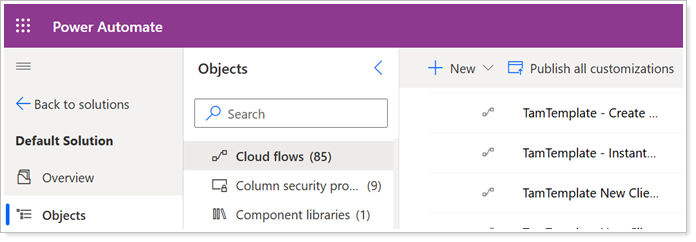
You can use the following Tamarac templates:
| flow Name | flow automation | Legacy Dynamics 365 Workflow |
|---|---|---|
| TamTemplate – Birthday Reminder |
When a contact in an active household has a birthday, the flow triggers a personalized email reminder or an in-app notification to team members based on assigned CSA or Primary Advisor for a client in CRM.
For more information, see Set client birthday reminders with Power Automate. |
Birthday Reminder |
| TamTemplate - Death of Client |
When your team updates the Deceased Date for a contact, the flow triggers a task with the recommended steps to take in both Tamarac CRM and Reporting.
For more information, see Automate tasks after client death with Power Automate. |
N/A |
| TamTemplate - Client Termination |
When your team updates the Termination Date for an account, the flow triggers a task with the recommended steps to take in the offboarding process.
For more information, see Automate client offboarding with Power Automate. |
|
| TamTemplate - New Client Onboarding FLOW 1 |
When a new household-type account is created via the lead qualification process, the flow triggers a task with recommended steps to fill in new client household information and prepare custodial forms.
For more information, see Onboarding clients with automated flows. |
New Client Onboarding/New Client Onboarding V.2 |
| TamTemplate - New Client Onboarding FLOW 2 |
When you complete the task from the New Client Onboarding FLOW 1, this follow-up flow triggers the necessary onboarding steps in this order:
For more information, see Onboarding clients with automated flows. |
New Client Onboarding/New Client Onboarding V.2 |
| TamTemplate - Lead to Account Conversion |
When you qualify a lead, this flow transfers custom mapped fields from the originating lead record to the new account record. Your firm can choose which lead fields to map when enabling the flow.
For more information, see Automate lead data conversion with Power Automate. |
N/A |
| TamTemplate - Lead to Contact Conversion |
When you qualify a lead, this flow transfers custom mapped lead contact fields to the new primary and secondary contact records for the household. Your firm can choose which contact fields to map when enabling the flow.
For more information, see Automate lead data conversion with Power Automate. |
N/A |
| TamTemplate - Instant Cloud Flow to Create SharePoint Document Locations for Accounts |
When you want to create a folder for an existing client in a chosen SharePoint location, you can manually trigger this flow to both create the folder in SharePoint and a new Document Location in CRM for linking.
For more information, see Create SharePoint locations from accounts. |
N/A |
| TamTemplate - Create SharePoint folder and Document Location for new Client |
When a new household-type account is created via the lead qualification process, the flow triggers a new folder created in SharePoint and linked with CRM automatically.
For more information, see Create SharePoint locations from accounts. |
N/A |
| TamTemplate - Clear emails for Account created from Lead |
When a new household-type account is created via the lead qualification process, the flow triggers to clear the following email address fields on the account that may have been prefilled automatically during qualification:
|
N/A |
|
When you submit a Client Info Update service request, this flow generates the corresponding tasks and notifications. Use the template that fits your firm's business unit structure.
For more information, see Automate client information updates with Power Automate. |
Client Info Update |
|
When you submit an Incoming Deposit service request, this flow generates the corresponding tasks and notifications. Use the template that fits your firm's business unit structure.
For more information, see Automate incoming deposits with Power Automate. |
Incoming Deposit |
|
When you submit a Strategy Updates service request, this flow generates the corresponding tasks and notifications. Use the template that fits your firm's business unit structure.
For more information, see Automate strategy updates with Power Automate. |
Strategy Updates |
| Create a new Phone call in the future based on recurrence - V2 |
When you want to schedule calls with a client, you can set this flow to trigger a recurring phone call per the desired frequency for an account record.
For more information, see Bi-weekly recurrence for tasks and phone calls. |
Create a new Phone Call in the future based on recurrence – V2.1 |
| Create a new Task in the future based on recurrence - V2 |
When you want to schedule calls with a client, you can set this flow to trigger a recurring task per the desired frequency for an account record.
For more information, see Bi-weekly recurrence for tasks and phone calls. |
Create a new Task in the future based on recurrence – V2.1 |
|
TamTemplate - Mailchimp Initial Sync List and Members to Dynamics Marketing Lists |
If you use the Mailchimp integration, you can trigger this flow to sync audience members from Mailchimp to CRM to create identical marketing lists.
For more information, see Sync Mailchimp audiences to CRM marketing lists with Power Automate. |
N/A |
|
TamTemplate - Mailchimp New Marketing List Created In Dynamics Flow |
If you use the Mailchimp integration, you can trigger this flow and sync CRM marketing list details to MailChimp. This flow prepares and links the lists so that the members can sync to Mailchimp in the TamTemplate - Mailchimp Link and Sync Marketing List Members to Audience flow.
For more information, see Sync new CRM marketing lists to Mailchimp with Power Automate. |
N/A |
|
TamTemplate - Mailchimp Link and Sync Marketing List Members to Audience |
If you use the Mailchimp integration, you can trigger this flow to sync the members of an existing CRM marketing list to the linked Mailchimp audience contacts.
For more information, see Link and sync existing marketing lists to Mailchimp with Power Automate. |
N/A |
If you have any questions about using Tamarac templates or need assistance implementing them, please reach out to Support.
Available Microsoft Power Automate flow templates
To generate more automation ideas and simplify your process, you can additionally browse Microsoft's Power Automate templates.
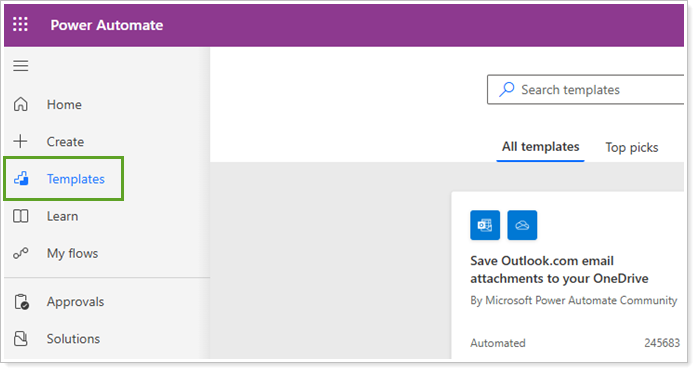
For detailed information, see Create a cloud flow from a template in Power Automate (links to an external site).
Additional information
For general steps to implement these Power Automate Flow templates, see Enable Power Automate flows.